While working on a visual studio web part project today, I did a minor re-org of some files to be put into the _layouts folder as part of the deployment process. Specifically, I renamed a .js file from “TypeAhead.js” to “TypeAhead(old).js” I plan to remove it as soon as its successor “TypeAhead.js” proves correct. It looked like this:
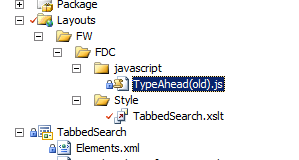
This immediately caused a problem with visual studio when I tried to deploy the project:
Error occurred in deployment step ‘Add Solution’: Failed to extract the cab file in the solution.
It turns out that you should not put a parenthesis in file names. I removed the parens and that solved the problem.
</end>

Follow me on Twitter at http://www.twitter.com/pagalvin
Hi Paul,
Just wanted to say thanks for a handy post – I had accidentally renamed one of my files with two dots before the file extension – quick google and your post came up first 🙂
Cheers
Alex
Thanks Paul.This tip proved quite useful.
Pingback: Deployment Error: Failed to extract the cab file in the solution. | Foo
Hi Paul,
Just got the same error and thanks to your post I didn’t spend all day on that issue.
I had a file with a “+” in it’s name that was hiding in a library of files I added to my VS project.
Thanks for sharing.
Francis