
Hi Community,
I have contributed List Search WebPart for SharePoint in CodePlex.
Project Description:
This Project provides the List Search WebPart for WSS 3.0 / SharePoint 2007. Just add the WebPart to page and specify the list name, filter fields, display fields and criteria.
Simple Interface for Tool Part with advanced features for list search.
Features
- Ajax Enabled
- Easy configuration of list
- Automatically populates List collection in Drop Down List
- Filter Fields Selection
- Display Fields Selection
- Query operator Selection
Configuration Steps
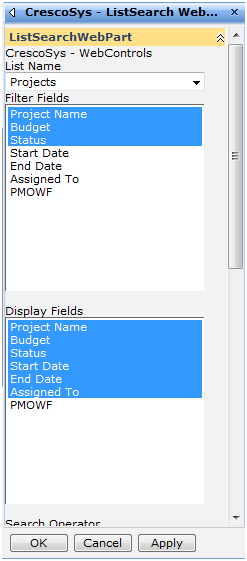
Open the WebPart in Edit Mode.
Filter Fields: Fields to be rendered at page with input box for filter fields.
Display Fields: Fields to be displayed in grid.
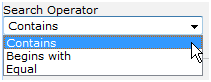
Condition criteria between the fields
When you apply changes the WebPart will render as below:

Please leave your new feature requests here: http://www.mstechblogs.com/Forums/viewtopic.php?f=17&t=2&start=0
I notice that it doesn’t give me an option to display the default columns (like name linked to document with edit menu). If I don’t select any display fields, it display’s the name column by default but I don’t see any other way to choose what other fields to display/not to display.
I notice that it doesn’t give me the result if I write a date. I have tried different date formats but it’s not displaying anything. Is there something wrong with the webpart?
Thanks for simple but great web part! But how can i make localisation of it(or change label of the button)?
Are this made for 2010 also?
hello ..
can i know if you have any version for sharepoint server 2010 ?
Salam mampir aja ah …