|
|
Drwy Udayakumar Ethirajulu , ar 25 Gorffennaf, 2012 Mewngofnodwch i Office365 Safle Datblygwr. Os nad ydych wedi cofrestru ar gyfer cyfrif datblygwr, darllen fy swydd flaenorol ar sut i gofrestru ar gyfer cyfrif Office365 Datblygwr.
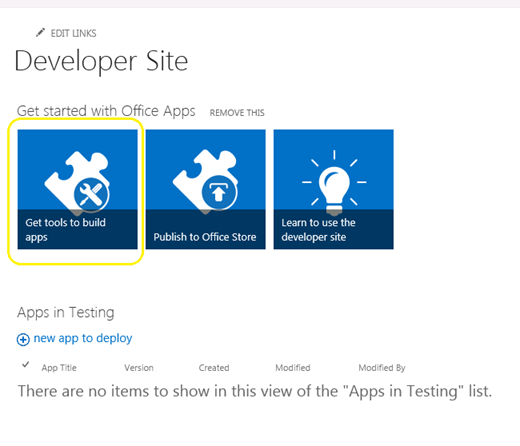
Navigate i SharePoint admin dudalen, a chliciwch ar “Cael arfau i adeiladu apps”
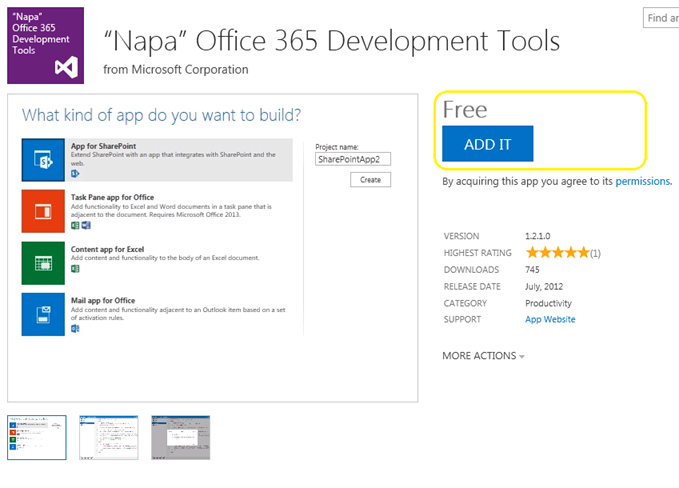
Cliciwch ar y “ADD TG” botwm yn y gornel dde, ac yn llofnodi wrth ddefnyddio eich pasbort ar gyfer storio.
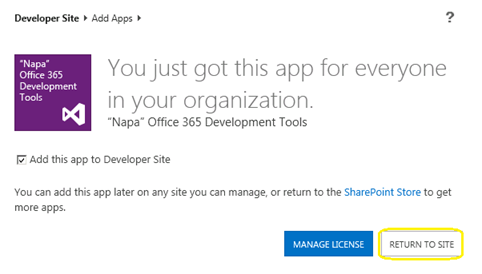
Cliciwch ar y “DYCHWELYD I'R SAFLE”
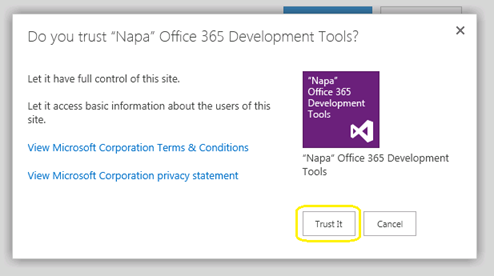
Bydd Popup yn ymddangos i gadarnhau yr Ymddiriedolaeth. Cliciwch ar “Ymddiriedolaeth Mae'n” botwm, ac yna byddwch yn cael eich ailgyfeirio i'r safle datblygwr.
Yn awr, bydd y app cael ei osod i mewn i'ch safle datblygwr. Cliciwch ar “Napa Swyddfa 365 Offer Datblygu” Page Cynnwys y Wefan i Lansio.
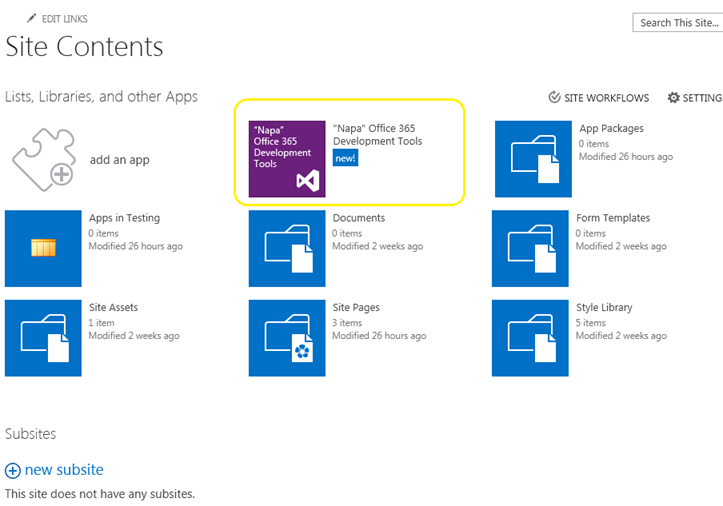
Nawr rydym yn cael ein gosod offer datblygu. Beth sydd nesaf? Gadewch i ni adeiladu y HelloWorld.
Drwy Udayakumar Ethirajulu , ar 24 Gorffennaf, 2012 Microsoft rhyddhau y Swyddfa / SharePoint 2013 Rhagolwg yr wythnos diwethaf. Byddai ein cwestiwn nesaf fod yn beth sy'n newydd yn Office365; dyma i chi fynd gofrestru ar gyfer mynediad i'r safle datblygwr isod a dechrau datblygu apps ar gyfer 2013.
Cofrestru Yma ar gyfer Safle Datblygwr
Unwaith i chi orffen yr arwydd i fyny broses, byddwch yn gallu cael mynediad i'r safle datblygwr. Pan llwythi tro cyntaf, bydd yr holl gwasanaeth sydd ei angen yn cael ei provisioned.
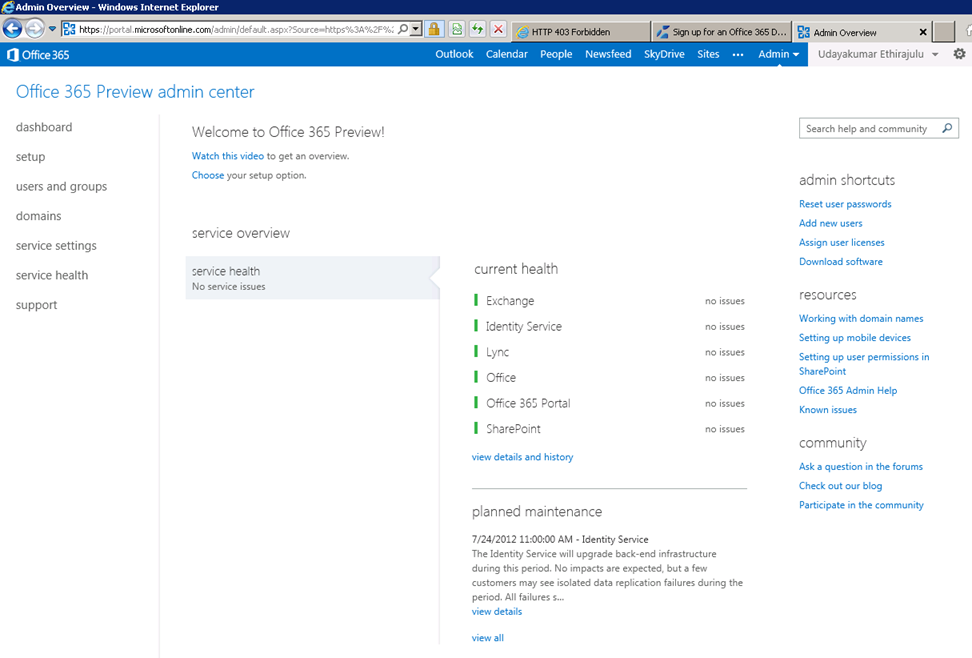
Bydd Dashboard arddangos yr archwiliad iechyd y gwasanaeth provisioned.
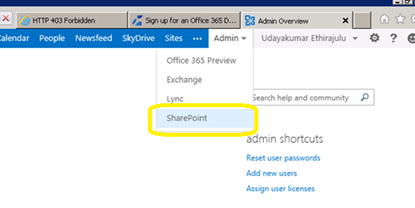
Nawr gadewch i ni geisio mynd i mewn SharePoint ar-lein gweinyddu. Cliciwch ar Menu Admin mewn rhuban a dewis o SharePoint dropdown.
Bydd SharePoint admin dudalen arddangos rhestr o'r Safle Casgliadau; yn ddiofyn mae'r gwasanaeth yn creu 3 casgliadau safle ac mae un wefan gyhoeddus.
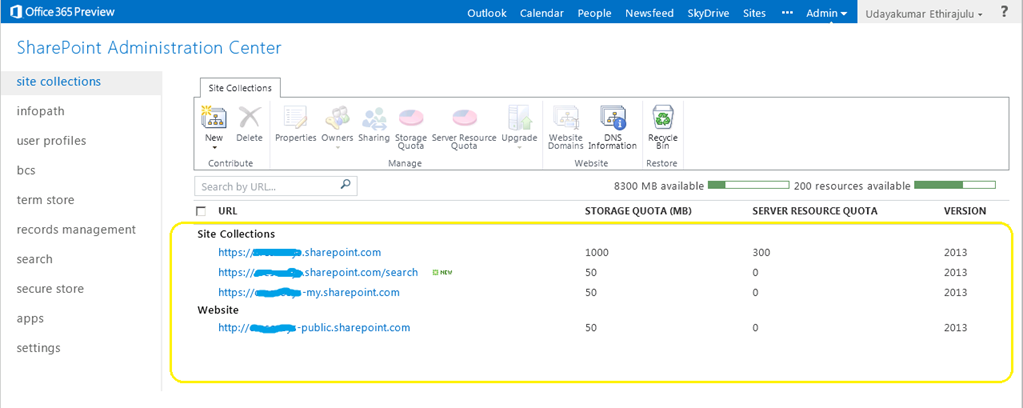
Cliciwch ar y casgliad safle porth, bydd yn llwytho'r SharePoint 2013 safle rhagolwg.
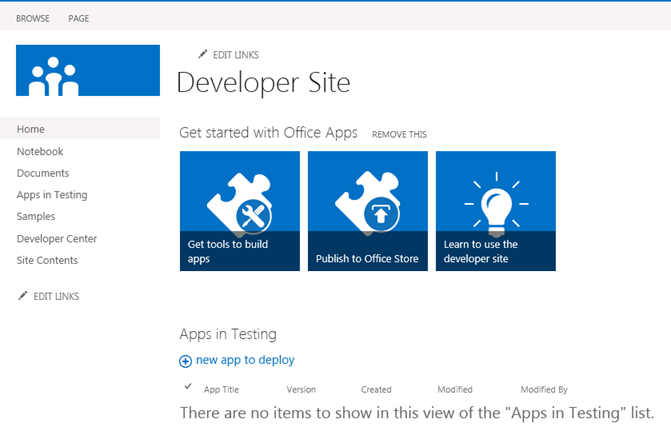
Yn fy swydd nesaf, byddwn yn siarad am y newydd Offeryn datblygu ar gyfer Office365 “Napa”
Drwy Udayakumar Ethirajulu , ar 19 Gorffennaf, 2012
Drwy Udayakumar Ethirajulu , ar 24 Medi, 2011 Mae'r rhan fwyaf ohonom yn gwybod bod SharePoint oblygiadau perfformiad, pan fydd yr olwg rhestr wedi mwy 2000 eitemau. SharePoint 2010 yn ein galluogi i gymryd rheolaeth dros y consumptions adnoddau ar Lefel We Cais. Byddai throttling Adnoddau yn caniatáu i ni osod y terfyn uchaf fesul olwg rhestr.
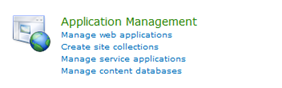
Gweinyddiaeth Ganolog -> (Rheoli Cais) Rheoli Ceisiadau We
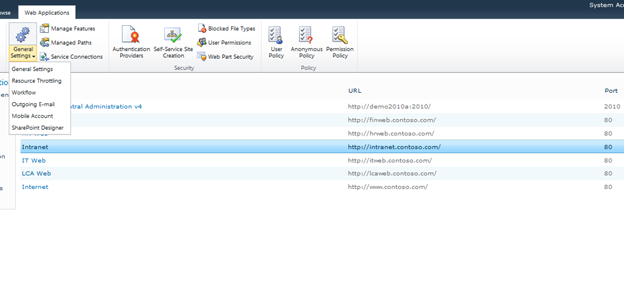
Dewiswch y cais ar y we oddi ar y rhestr, a chliciwch ar Gosodiadau Cyffredinol -> Throttling Adnoddau
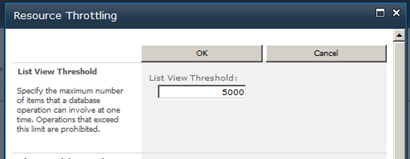
Gosod y gwerth uchaf ar gyfer eitemau rhif retuned o ystyried. Dyma'r terfyn i ddychwelyd gwerthoedd ar farn.
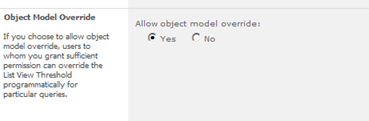
Gallwch wrthod y gosodiadau ar gyfer model gwrthrych.
Drwy Udayakumar Ethirajulu , ar 4 Awst, 2011
|
Cofrestru Heddiw!
Trowch i SharePoint 2010 i awtomeiddio prosesau busnes & darparu consistencyin y ffordd y caiff eich busnes ei redeg.
|
|
Fel arweinydd dechnoleg, eich bod yn gwybod yr her o weithredu prosesau busnes ar draws eich sefydliad. Yn nodweddiadol, nid yw'r prosesau yn integreiddio â'r ffordd y mae pobl yn gweithio mewn gwirionedd. Ar gyfer proses fusnes i fod yn effeithiol, rhaid iddo gael ei integreiddio gydag offer bob dydd a cheisiadau a ddefnyddir yn y gweithle fel ei fod yn dod yn rhan o'r drefn ddyddiol. Yn y gweithle electronig, mae hyn yn cynnwys integreiddio gyda e-bost, calendrau, rhestrau tasgau, a safleoedd cydweithio We.
Wrth i gwmnïau ceisio mynd i'r afael â'r heriau hyn, mwy a mwy yn troi tuag at ateb llif gwaith cadarn sy'n galluogi penseiri ateb, dylunwyr, a gweinyddwyr i wella prosesau busnes: Microsoft SharePoint 2010.
Ymunwch Microsoft SharePoint MVP Uday Ethirajulu ac Atebion RSC ar Fedi 8fed, 2011 ar 11:00am EST ar gyfer seminar ar y we llawn gwybodaeth (webinar) gan ei fod yn trafod ac yn dangos manteision sylfaenol o ddefnyddio llif gwaith yn SharePoint 2010 i hwyluso prosesau busnes a gwella cydweithio. Bydd Uday tynnu sylw at y gwerth busnes y gallwch ei gael o 2010 ac yn canolbwyntio ar dri maes o ddiddordeb:
- Llif Gwaith yn SharePoint Designer
- Custom llif gwaith – Defnyddio Visual Studio
- Llif proses heb SharePoint llif gwaith
Felly, cofrestrwch heddiw, oherwydd mae hyn yn un digwyddiad nad ydych am i golli!

|
Drwy Udayakumar Ethirajulu , ar 14 Gorffennaf, 2011 Dyma fy webinar sydd ar y gweill yn SharePoint 2010 Gwybodaeth Busnes.
|
Mae amser yn rhedeg allan! Cofrestru Heddiw!
Trowch tuag at Ateb Gwybodaeth Busnes cadarn i rymuso eich Sefydliad
|
Fel arweinydd dechnoleg, eich bod yn gwybod yn yr amgylchedd hwn economaidd heriol, cael mynediad at y wybodaeth gywir ar yr amser iawn wedi dod yn un o'r heriau mwyaf ar gyfer sefydliadau. Mae rhanddeiliaid allweddol am adroddiad / dangosfwrdd arbennig. Dadansoddi a dehongli data distrwythur yn dod yn fwy a mwy cymhleth.
Wrth i gwmnïau ceisio mynd i'r afael â'r heriau hyn, mwy a mwy yn troi tuag at ateb BI gadarn sy'n rhoi grym i bobl sy'n gwneud penderfyniadau sefydliad, gwella effeithiolrwydd sefydliadol, ac yn darparu'r asgwrn cefn i wir alluogi effeithlonrwydd TG: Microsoft SharePoint 2010.
Ymunwch Microsoft SharePoint MVP Udayakumar Ethirajulu ar 4 Awst, 2011 ar 11:00yn y EST ar gyfer seminar llawn gwybodaeth ar y we (webinar) gan ei fod yn trafod ac yn dangos galluoedd mwyaf cyffrous newydd o SharePoint 2010. Bydd Uday tynnu sylw at y gwerth busnes, gallwch ei gael gan y nodweddion newydd yn 2010 canolbwyntio ar dri maes o ddiddordeb:
- Galluoedd ar gyfer Penseiri Ateb a Datblygwyr
- Galluoedd ar gyfer Penseiri Seilwaith a TG Manteision
- Galluoedd ar gyfer Defnyddwyr a Menter yn ei gyfanrwydd
Felly, cofrestrwch heddiw, oherwydd mae hyn yn un digwyddiad nad ydych am i golli!

|
Drwy Udayakumar Ethirajulu , ar 1 Gorffennaf, 2011
Drwy Udayakumar Ethirajulu , ar 6 Mehefin, 2011 Mae hyn yn fath o gais gyffredin o cleient i gael math o ddileu botwm bach neu ddelwedd ym mhob i ddileu.
Nid oeddwn yn gallu dod o hyd i unrhyw ddull ddefnyddio Rheolau i ddileu'r rhesi. Byddai un cod llinell # C wneud y tric J
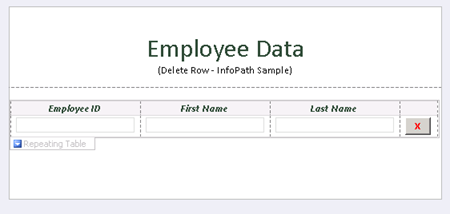
Ychwanegwch Button a Cliciwch ar y “Golygu Cod Ffurflen” yn Eiddo Button.
cyhoeddus
gwag DeleteRow_Clicked(gwrthrych trosglwyddydd, ClickedEventArgs a)
{
// Ysgrifennwch eich cod yma.
e.Source.DeleteSelf();
}
Pan fydd dileu'r ffynhonnell ar gyfer y botwm, ei fod yn dileu'r nod ar hyn o bryd yn y DOM, y nod yn cynnwys y rhes gyfan.
Lawrlwythwch y Ffurflen sampl â chod yma.

Drwy Udayakumar Ethirajulu , Mai 31ain, 2011 Fi jyst gosod y Modiwl Gwasanaethau Ar-lein ar gyfer Microsoft Windows PowerShell i ffurfweddu un arwydd ar gyfer y Swyddfa 365.
Pan fyddaf yn ceisio rhedeg y sgript ar gyfer Arwyddion PowerShell Sengl ar Modiwl:
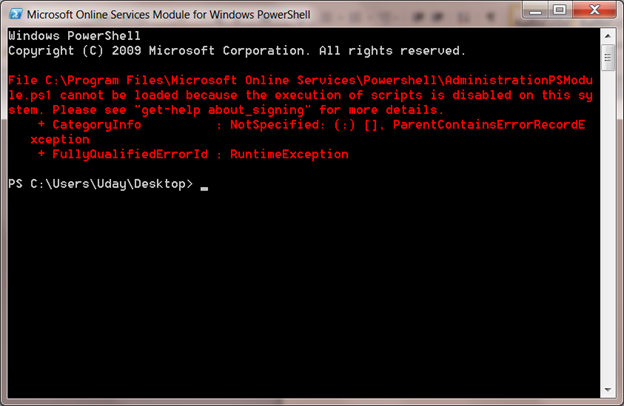
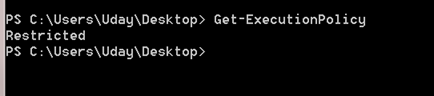
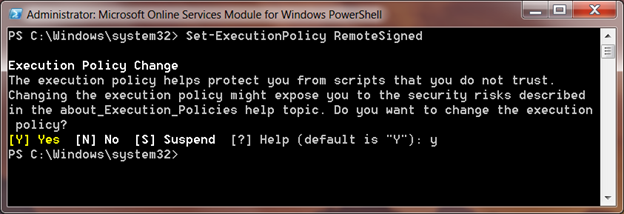
Mae'r polisi sgript diofyn gweithredu wedi ei osod i Cyfyngedig. Gallwch gael y diffyg gweithredu polisi drwy ddefnyddio cmdlet Get-ExecutionPolicy
Set-ExecutionPolicy
Bydd yn gosod-ExecutionPolicy osod y polisi yn eich system leol, Bydd RemoteSigned ymddiried holl sgriptiau lleol a'u llofnodi rhyngrwyd sgript llwytho i lawr.
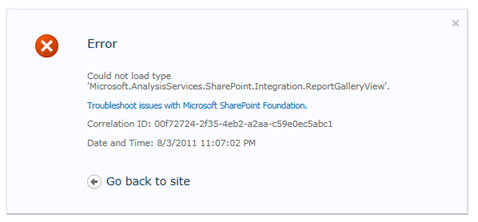
Drwy Udayakumar Ethirajulu , ar 10 Mai, 2011 Gwall:
Methu llwytho fath 'Microsoft.AnalysisServices.SharePoint.Integration.ReportGalleryView'.
Crynodeb:
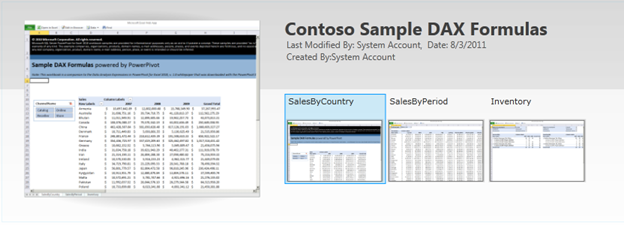
Pŵer colyn Llyfrgell golygfeydd arbennig fel oriel barn, carwsél barn, ac ati. Y farn diofyn ar gyfer y llyfrgell y cyfeiriad gan y cynulliad ‘Microsoft.AnalysisServices.SharePoint.Integration.ReportGalleryView’, sy'n cael ei becynnu mewn pecyn ateb “powerpivotwebapp.wsp“.
Datrys:
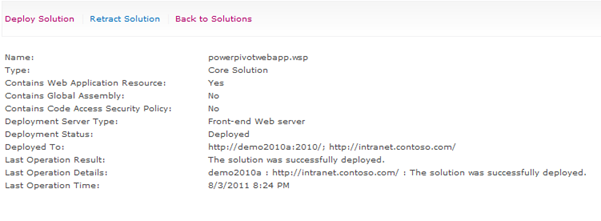
Pan PowerPivot addin defnyddio ar gyfer SharePoint, mae'n ychwanegu dau becyn ateb i “Atebion Fferm”
Ewch i Gweinyddu Canolog, Cliciwch ar Gosodiadau System yn Navigation Chwith.
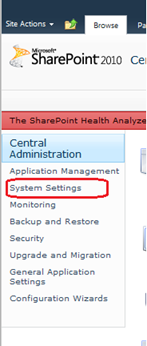
Yna Cliciwch ar “Rheoli atebion fferm” dan Rheoli Fferm.

Bydd rhestr o atebion fferm yn cael eu rhestru.
Byddai Powerpivotfarm.wsp yn cael eu defnyddio eisoes yn fyd-eang.
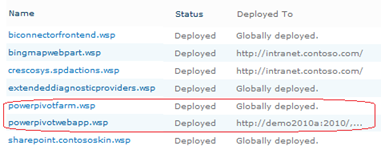
Cliciwch ar y powerpivotwebapp.wsp a defnyddio ateb i'r app we lle rydych yn ceisio ei greu Pŵer colyn Oriel.
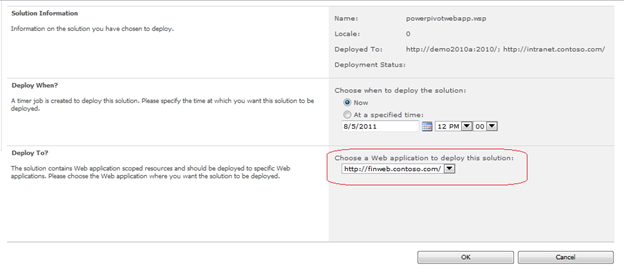
Rydych yn dda i fynd. Creu y llyfrgell nawr, unrhyw wall J
|
|