|
|
Ըստ Udayakumar Ethirajulu , հուլիսի 25-ին, 2012 Մուտք գործեք, որպեսզի Office365 Developer Site. Եթե դուք չեք ստորագրել մինչեւ մշակողի հաշվի մեջ, կարդալ Իմ Անցած գրառումը թե ինչպես պետք է գրանցվել Office365 մշակողի հաշվի մեջ.
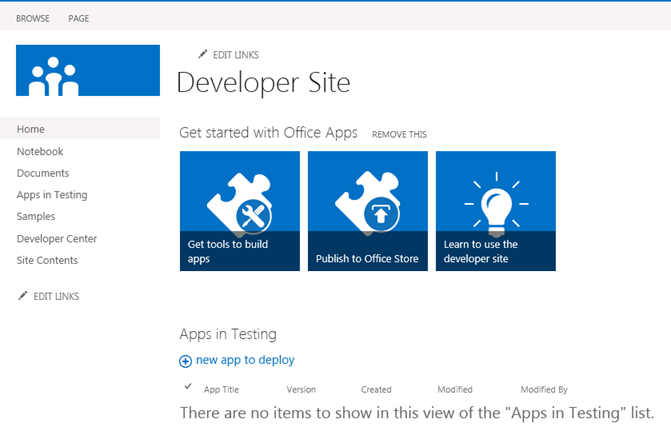
Navigate to SharePoint admin - ից, եւ սեղմեք “Ստանալ գործիքներ կառուցել Apps”
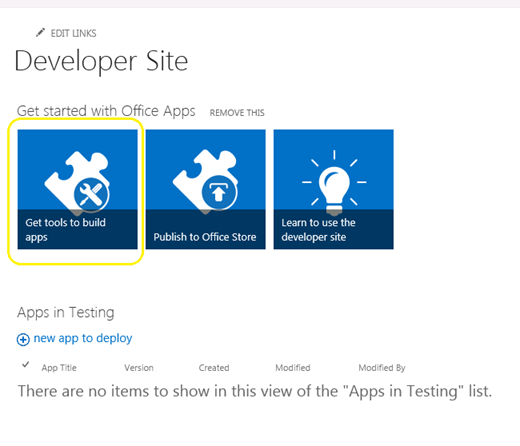
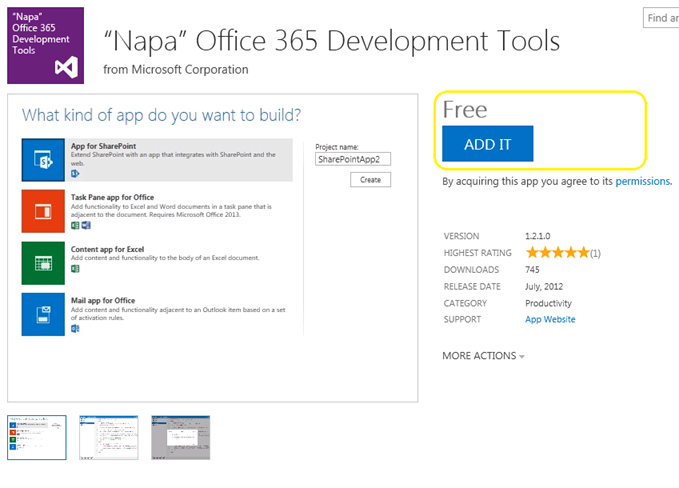
Սեղմեք վրա “Ավելացնել” կոճակը աջ անկյունում, եւ մուտք գործել, օգտագործելով ձեր անձնագիրն է խանութ.
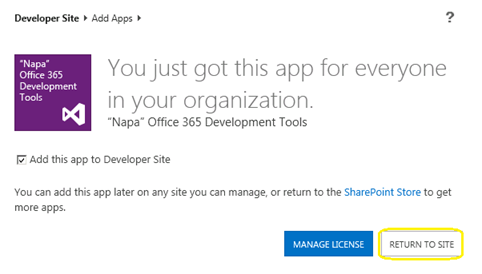
Սեղմեք վրա “ՎԵՐԱԴԱՌՆԱԼ SITE”
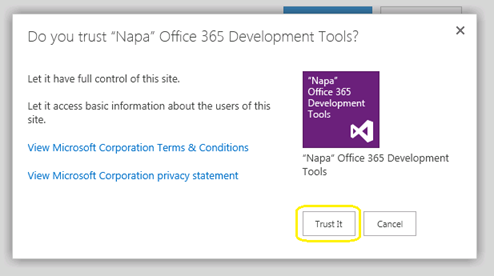
Popup կհայտնվի հաստատել վստահությունը. Սեղմեք վրա “Վստահեք It” կոճակ, եւ ապա դուք պետք է Վերահղված է մշակողի կայքում.
Այժմ ծրագիրը կտեղադրվի Ձեր մշակողի կայքում. Սեղմեք վրա “NAPA Office 365 Զարգացման գործիքներ” Հայաստանի Կայքի Contents էջը է սկսել.
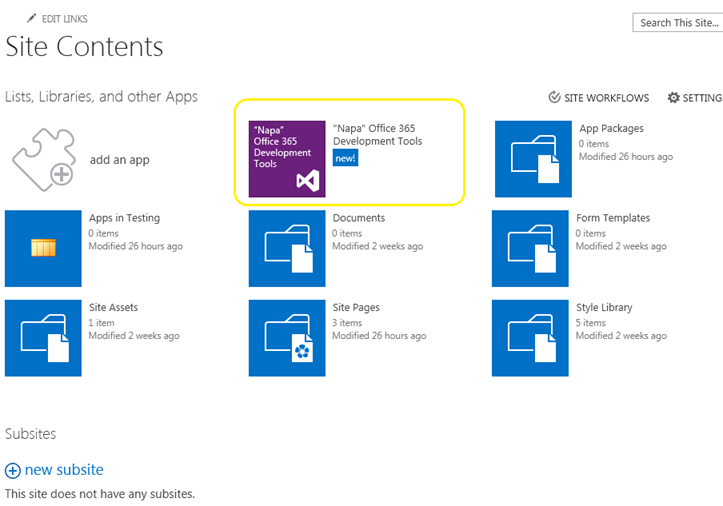
Հիմա մենք ստացանք մեր զարգացման գործիքներ տեղադրել. Ինչ Հաջորդ? Եկեք կառուցենք HelloWorld.
Ըստ Udayakumar Ethirajulu , Հուլիսի 24 - ին, 2012 Microsoft SharePoint հրապարակել եմ աշխատանք / 2013 Preview անցյալ շաբաթ. Մեր հաջորդ հարցը կլինի, թե ինչ նոր Office365; Այստեղ դուք գնում եք գրանցվել մշակողի Site Access ներքեւում եւ սկսել մշակել ծրագրեր 2013.
Գրանցվել է: Այստեղ են կայքի Developer
Երբ դուք ավարտել գրանցման գործընթացը դուք կկարողանաք մուտք developer կայքը. Երբ առաջին անգամ բեռներ, բոլոր պահանջվող ծառայությունը կլինի provisioned.
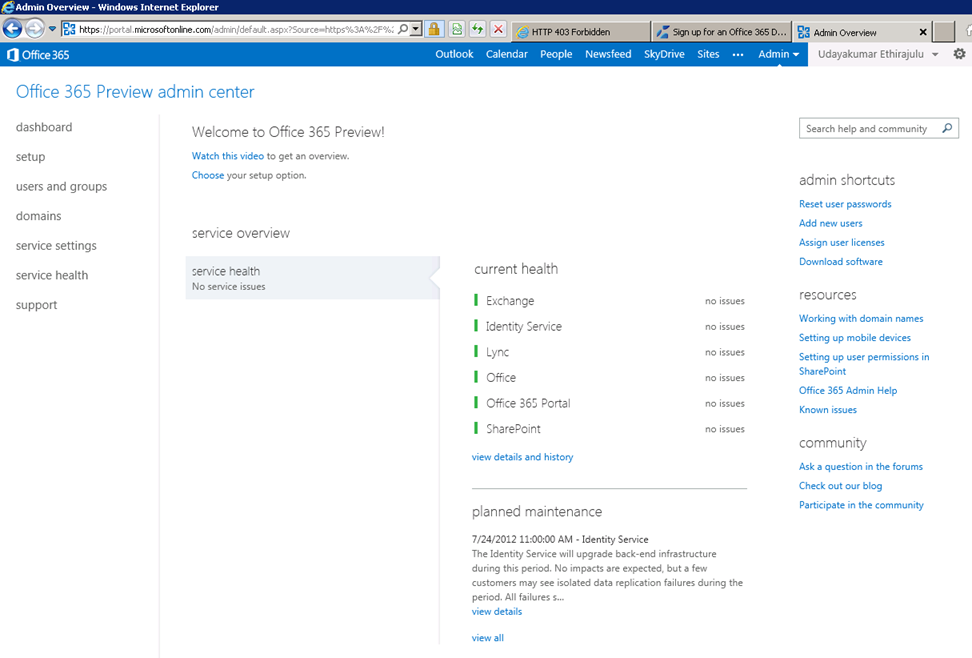
Dashboard կցուցադրեն առողջական ստուգում ծառայության provisioned.
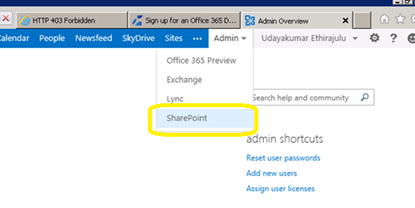
Հիմա փորձենք ստանալու մեջ SharePoint առցանց կառավարման. Սեղմեք Admin ցանկից ժապավենը եւ ընտրել SharePoint է dropdown.
SharePoint admin էջը կցուցադրեն ցանկը կայքի հավաքածուների; ըստ նախնականի ծառայությունը ստեղծում 3 site հավաքածուները եւ մեկ Հանրային ինտերնետ կայքեր.
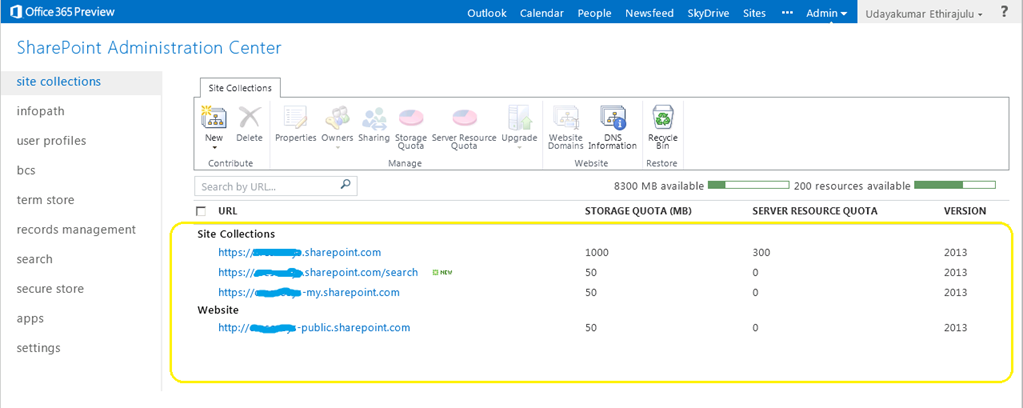
Սեղմեք պորտալի կայքում հավաքածուի մեջ, այն բեռնել SharePoint 2013 Preview site.
Իմ Հաջորդ գրառումը, մենք կխոսենք նոր զարգացման գործիք Office365 “NAPA”
Ըստ Udayakumar Ethirajulu , հուլիսի 19 -, 2012
Ըստ Udayakumar Ethirajulu , սեպտեմբերի 24, 2011 Մեզանից շատերը գիտեն, որ SharePoint ունի կատարողական հետեւանքներ, երբ ցանկը տեսք ունի ավելի 2000 Նյութերի. SharePoint 2010 մեզ հնարավորություն է տալիս վերցնել հսկողության ռեսուրսի consumptions ժամը վեբ մակարդակով. Ռեսուրսների Throttling թույլ կտա մեզ համար առավելագույն սահմանաչափը մեկ պրոֆիլը Թարգմանել լեզվով Թարգմանված.
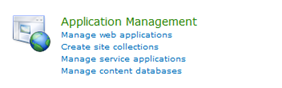
Կենտրոնական Վարչություն -> (Դիմում կառավարում) Կառավարեք վեբ դիմումները
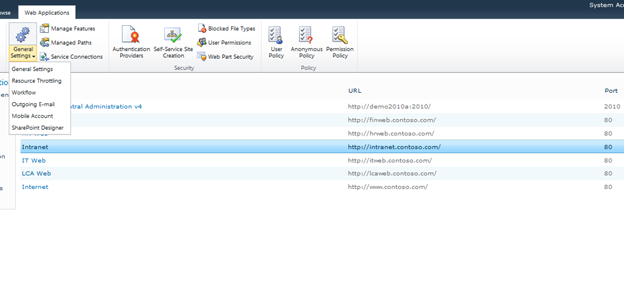
Ընտրել վեբ ցանկից, եւ սեղմեք Ընդհանուր պարամետրեր -> Ռեսուրսների Throttling
Նախադրել առավելագույն արժեքը քանակի վերաբերյալ retuned նպատակով. Սա սահմանը վերադառնալու արժեքներ դիտարկումներ.
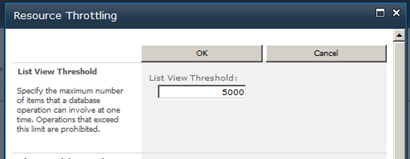
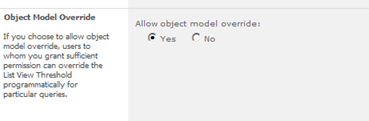
Դուք կարող եք անտեսեն պարամետրերը համար օբյեկտի մոդելը.
Ըստ Udayakumar Ethirajulu , օգոստոսի 4 -, 2011
|
Գրանցում Այսօր!
Դիմում Sharepoint 2010 Ինչպես ավտոմատ բիզնես գործընթացների & ապահովել consistencyin ուղին ձեր բիզնեսը հաշվով.
|
|
Որպես տեխնոլոգիական առաջնորդի, գիտեք մարտահրավերները իրականացման բիզնես գործընթացների ողջ Ձեր կազմակերպության. Սովորաբար, գործընթացները չեն ինտեգրվել հետ: Ճանապարհին մարդիկ իրականում աշխատում. Բիզնես գործընթացների արդյունավետ լինել, Այնուամենայնիվ, պետք է ինտեգրված ամենօրյա գործիքների եւ դիմումների օգտագործվող աշխատավայրում, որպեսզի այն դառնա մասը առօրյան. Իսկ էլեկտրոնային աշխատավայրում, սա ներառում է ինտեգրման հետ էլեկտրոնային փոստով, օրացույցներ, հանձնարարության ցուցակները, եւ համագործակցության Վեբ կայքեր.
Ինչ ընկերությունները ձգտում են անդրադառնալ այդ մարտահրավերներին, ավելի ու ավելի են դառնում դեպի առողջ աշխատանքի արդյունքում լուծում, որը թույլ է տալիս լուծման ճարտարապետներին, դիզայներները, եւ ադմինիստրատորները բարելավել բիզնես գործընթացների: Microsoft Sharepoint 2010.
Միանալ Microsoft Sharepoint MVP Uday Ethirajulu եւ RSC լուծումներ սեպտեմբերի 8րդ, 2011 է 11:00am EST համար տեղեկատվական վեբ - սեմինար (webinar) ինչպես նա քննարկում եւ ցուցադրում է առաջնային առավելությունները, օգտագործելով workflows է Sharepoint 2010 հեշտացնել բիզնես գործընթացների եւ բարելավել համագործակցությունը. Uday ը կարեւորում գործարար արժեքը կարող եք ստանալ 2010 եւ կենտրոնանալ երեք ոլորտներում հետաքրքրություն:
- Աշխատանքի արդյունքում ի Sharepoint դիզայներ
- Պատվերով Workflows – Օգտագործելով Visual Studio
- Գործընթացը հոսքի առանց աշխատանքի արդյունքում Sharepoint
Այսպիսով, գրանցվել է այսօր, որովհետեւ սա մի միջոցառում չեք ուզում բաց թողնել!

|
Ըստ Udayakumar Ethirajulu , Հուլիսի 14 -, 2011 Ահա իմ առաջիկա webinar է Sharepoint 2010 Business Intelligence.
|
Ժամանակն անցնում է! Գրանցում Այսօր!
Շրջվում դեպի առողջ բիզնես հետախուզության լուծման հզորացնել Ձեր կազմակերպության
|
Որպես տեխնոլոգիական առաջնորդի, գիտեք, այս դժվար տնտեսական միջավայրում, getting access to the right information at the right time has become one of the biggest challenges for organizations. A key stakeholder wants a special report/dashboard. Վերլուծություն եւ մեկնաբանումը unstructured տվյալների դառնում է ավելի ու ավելի բարդ.
Ինչ ընկերությունները ձգտում են անդրադառնալ այդ մարտահրավերներին, ավելի ու ավելի են դառնում դեպի առողջ BI լուծում, որ empowers կազմակերպության որոշում կայացնողներին, բարելավվում կազմակերպական արդյունավետության, եւ ապահովում է մայրուղային որպեսզի իսկապես, միացրու այն արդյունավետությունը: Microsoft Sharepoint 2010.
Միանալ Microsoft Sharepoint MVP Udayakumar Ethirajulu օգոստոսի 4 -, 2011 է 11:00Թեմա. EST համար տեղեկատվական վեբ - սեմինար (webinar) ինչպես նա քննարկում եւ ցուցադրում է առավել հուզիչ նոր կարողությունները Sharepoint 2010. Uday ը կարեւորում գործարար արժեքը կարող եք ստանալ նոր առանձնահատկությունների մասին 2010 կենտրոնանալ երեք ոլորտներում հետաքրքրություն:
- Հնարավորությունները լուծման ճարտարապետների եւ Կառուցապատողներ
- Հնարավորությունները եւ ենթակառուցվածքների ճարտարապետների եւ ՏՏ կողմ
- Հնարավորությունները օգտվողների համար եւ ձեռնարկության որպես ամբողջություն
Այսպիսով, գրանցվել է այսօր, որովհետեւ սա մի միջոցառում չեք ուզում բաց թողնել!

|
Ըստ Udayakumar Ethirajulu , Հուլիսի 1 - ին, 2011
Ըստ Udayakumar Ethirajulu , հունիսի 6 - րդ, 2011 Այս տեսակ սովորական հարցման հաճախորդին ունենալ նման փոքր ջնջել կոճակին կամ կերպարի մեջ ամեն ջնջել.
Ես չէի կարող գտնել որեւէ մոտեցում, օգտագործելով կանոնները ջնջել այն տողերը,. Մի տող C # կոդը անելու են խաբել J
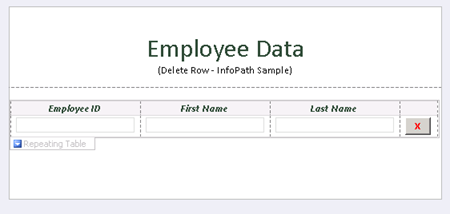
Այս լուս. Կոճակը եւ սեղմեք “Խմբագրել Ձեւ օրենսգիրք” ի կոճակը հատկությունների.
հասարակական
անվավեր DeleteRow_Clicked(օբյեկտ հաղորդիչ, ClickedEventArgs իսկ)
{
// Գրեք ձեր կոդը այստեղ.
e.Source.DeleteSelf();
}
Երբ ջնջել աղբյուրը համար կոճակը, այն deletes ներկա հանգույց է Dom-, որ ուռուցք է պարունակում ողջ մուտք.
Ներբեռնեք օրինակելի ձեւի հետ կոդը այստեղ.

Ըստ Udayakumar Ethirajulu , Մայիսի 31 -, 2011 Ես պարզապես տեղադրել Microsoft Օնլայն Ծառայություններ մոդուլի համար Windows PowerShell կարգավորել միայնակ նշանը համար Office 365.
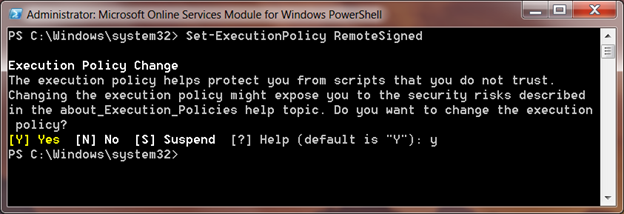
Երբ ես փորձում գործարկել PowerShell սցենարը Եզակի Գրանցվել վրա մոդուլի:
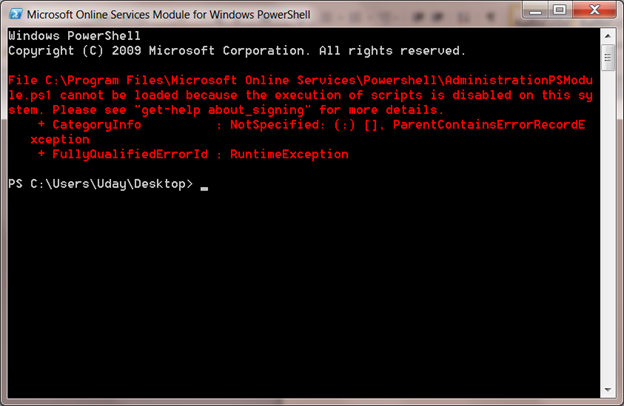
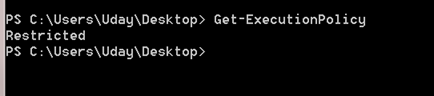
Նախնական սցենարը կատարման քաղաքականության սահմանված Արգելված. Դուք կարող եք ձեռք բերել նախնական կատարման քաղաքականության միջոցով cmdlet Get-ExecutionPolicy
Set - ExecutionPolicy
Սահմանել-ExecutionPolicy սահմանել քաղաքականությունը ձեր տեղական համակարգի, RemoteSigned չի վստահում տեղական բոլոր սցենարների եւ ստորագրել script բեռնել ինտերնետից.
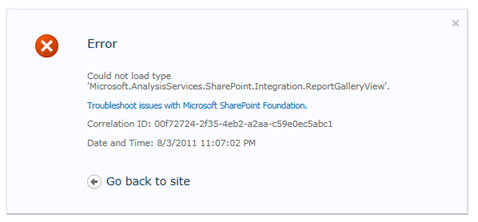
Ըստ Udayakumar Ethirajulu , Մայիսի 10 -, 2011 Սխալ:
Հնարավոր չէ բեռնել 'տիպը Microsoft.AnalysisServices.SharePoint.Integration.ReportGalleryView..
Ամփոփում:
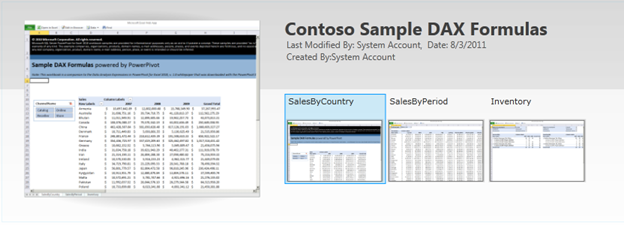
Power առանցք Գրադարան ունի որոշ հատուկ կարծիքները, ինչպիսիք են ցուցասրահի տեսք, կարուսել դիտել, եւ այլն:. The Նայել համար գրադարանի ունի տեղեկանք Վեհաժողովը ‘Microsoft.AnalysisServices.SharePoint.Integration.ReportGalleryView’, որը փաթեթավորված լուծման փաթեթի “powerpivotwebapp.wsp“.
Որոշում:
Երբ PowerPivot addin տեղակայվել է Sharepoint, այն ավելացնում է երկու փաթեթները լուծման համար “Ֆարմ Solutions”
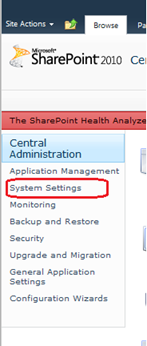
Գնալ կենտրոնական վարչության, Սեղմեք համակարգի պարամետրերը ձախ նավիգացիայի.
Հետո սեղմեք “Կառավարեք Ֆարմ լուծումներ” Մինչեւ Ֆարմ կառավարում.

Ցանկ Ֆարմ լուծումների չի նշված.
Powerpivotfarm.wsp կլինի արդեն տեղակայվել աշխարհում.
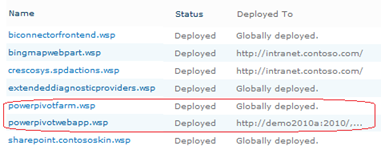
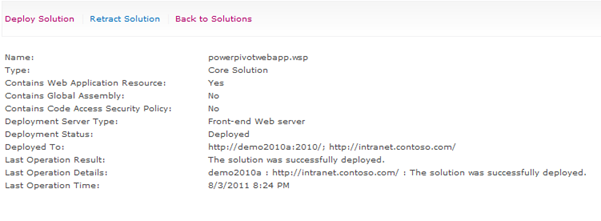
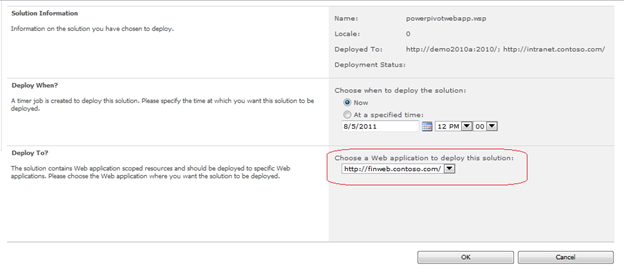
Սեղմեք powerpivotwebapp.wsp եւ տեղակայել է լուծում ինտերնետային ծրագրում, որտեղ դուք փորձում է ստեղծել հոսանքի առանցքում Պատկերասրահ.
Դու լավ է գնամ. Ստեղծել գրադարանից հիմա, ոչ սխալ J
|
|