|
|
By Udayakumar Ethirajulu , á 25 júlí, 2012 Skráðu þig inn til Office365 Developer Site. Ef þú hefur ekki skráð þig fyrir reikning verktaki, lesa fyrri staða mín um hvernig á að skrá þig fyrir Office365 Developer reikning.
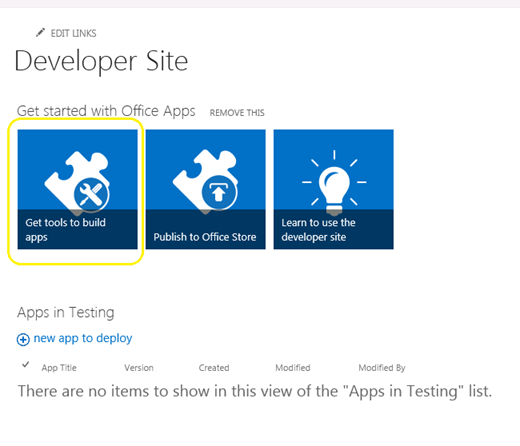
Sigla til SharePoint admin síðu, og smelltu á “Fá verkfæri til að byggja apps”
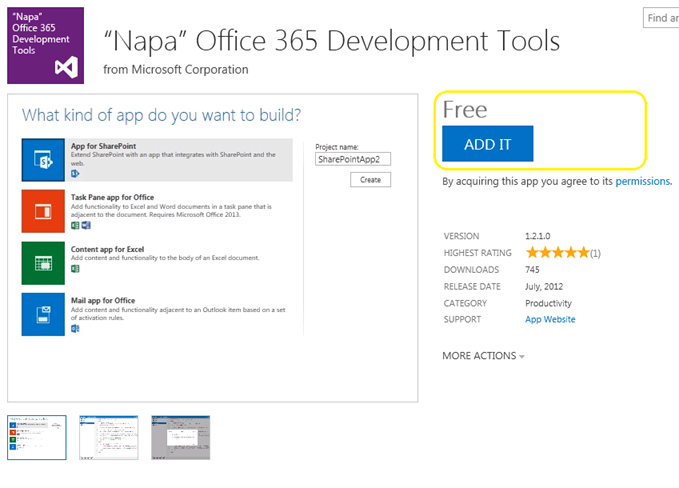
Smelltu á “Bæta við það” hnappinn í hægra horninu, og skrá sig inn með vegabréf fyrir verslun.
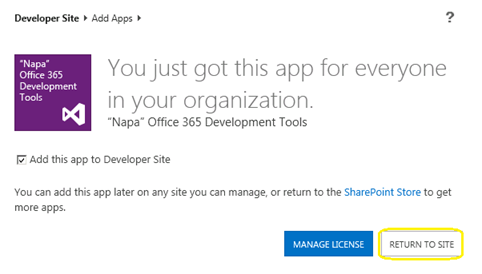
Smelltu á “Aftur á síðuna”
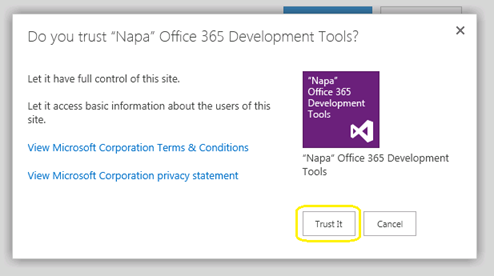
Almenningur mun birtast til að staðfesta traust. Smelltu á “Treysta henni” hnappur, og þá verður þú að vera vísað að hönnuða.
Nú app verður sett inn á síðuna Verktaki. Smelltu á “Napa Office 365 Development Tools” í síðuna Contents til Sjósetja.
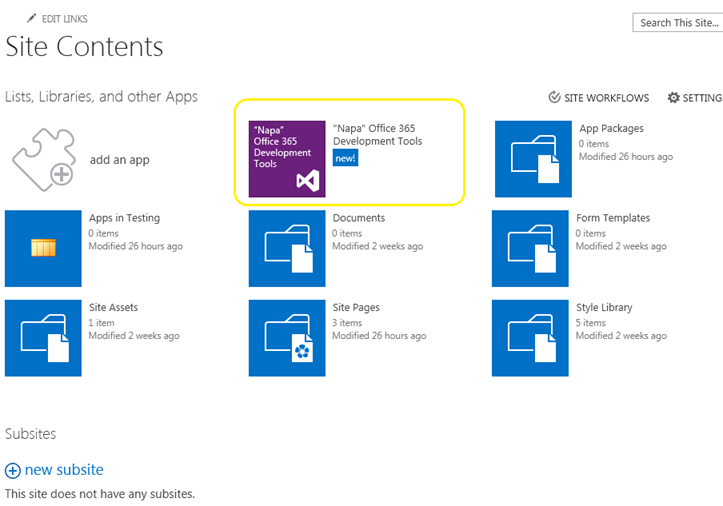
Nú fengum við þróun verkfæri okkar sett. Hvað er næst? Við skulum byggja HelloWorld.
By Udayakumar Ethirajulu , on July 24th, 2012 Microsoft gaf út Office / SharePoint 2013 Preview síðustu viku. Næsta spurning okkar væri það sem er nýtt í Office365; hér þú fara skrá þig í verktaki síðuna aðgang neðan og byrja að þróa apps fyrir 2013.
Skráning hér fyrir Site Verktaki
Þegar þú hefur lokið við skilti upp ferli sem þú verður að vera fær um að fá aðgang að verktaki síðuna. Þegar það hleðst fyrsta skipti, alla nauðsynlega þjónustu verður skilyrtri.
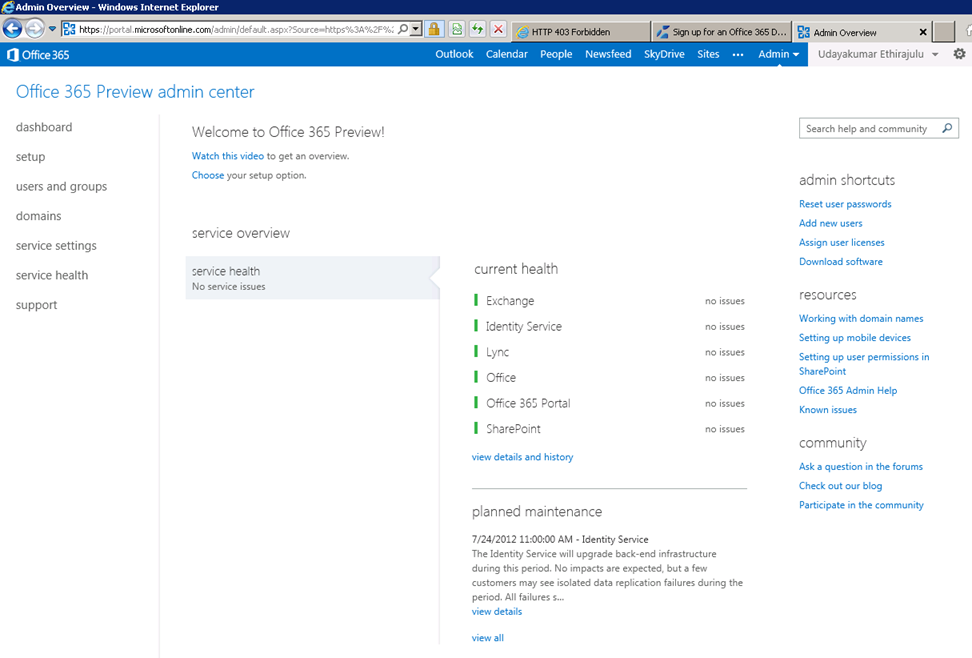
Mælaborð mun birta heilsu stöðva af þjónustu skilyrtra.
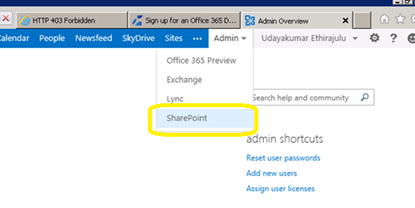
Nú skulum reyna að komast inn í SharePoint netinu gjöf. Smelltu á Admin Valmynd í borði og velja SharePoint frá listanum.
SharePoint admin síða mun birta lista yfir Söfn síðunni; sjálfgefið að þjónustan skapar 3 síða söfn og einn opinber website.
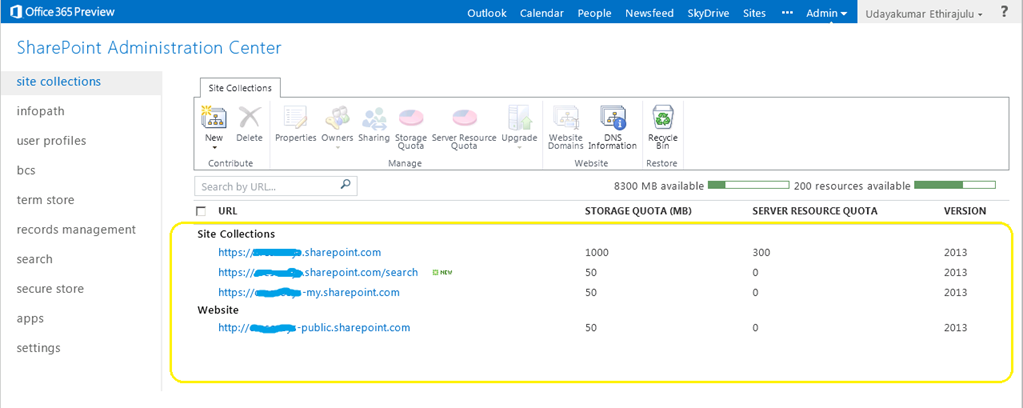
Smelltu á vefsíðunni staður safn, það mun hlaða SharePoint 2013 forsýning síða.
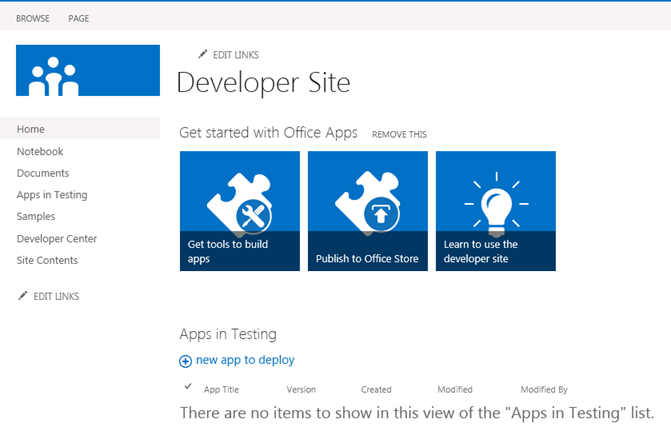
Í næstu færslu minni, Við munum tala um nýja þróun Tól fyrir Office365 “Napa”
By Udayakumar Ethirajulu , á Júlí 19, 2012
By Udayakumar Ethirajulu , á 24 september, 2011 Flest okkar vita að SharePoint hefur árangur áhrif, þegar lista View hefur meira 2000 atriði. SharePoint 2010 gerir okkur kleift að taka stjórn á úrræði neyslu á Vefur umsókn stigi. Resource Throttling myndi leyfa okkur að setja þak á útsýni lista.
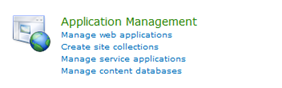
Central Administration -> (Umsókn Stjórn) Stjórna Web Forrit
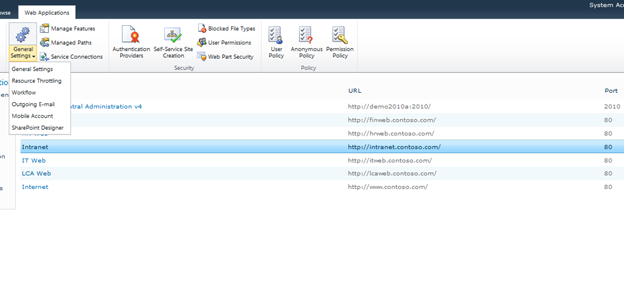
Veldu vefur forrit af listanum, og smelltu á General Settings -> Resource Throttling
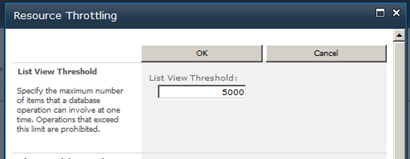
Setja hámarks gildi fyrir atriði númer retuned í ljósi. Þetta er takmörk skila gildi á skoðunum.
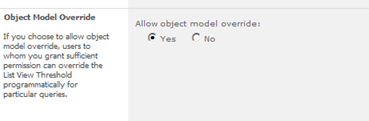
Þú getur hunsa stillingar fyrir líkan mótmæla.
By Udayakumar Ethirajulu , á ágúst 4, 2011
|
Nýskráning í dag!
Snúa að SharePoint 2010 til að gera sjálfvirkan viðskipti aðferð & veita consistencyin leið fyrirtækið þitt er að keyra.
|
|
Sem tækni leiðtogi, þú veist áskoranir framkvæmd viðskipti aðferð yfir fyrirtækinu þínu. Venjulega, ferli ekki aðlagast ekki við því hvernig fólk í raun að vinna. Fyrir viðskipti aðferð til að skila árangri, það verður að samþætta með daglegu tæki og forrit sem notuð eru á vinnustað þannig að hún verður hluti af daglegu lífi. Í rafrænu vinnustað, Þetta felur í sér samþættingu við tölvupósti, dagatal, verkefni listi, og samvinnu Vefur staður.
Eins og fyrirtæki leitast við að takast á við þessar áskoranir, fleiri og fleiri eru að snúa í átt að öflugri workflow lausn sem gerir lausn arkitektar, hönnuðir, og stjórnendur til að bæta viðskipti aðferð: Microsoft SharePoint 2010.
Sameina Microsoft SharePoint MVP Uday Ethirajulu og RSC Solutions september 8th, 2011 á 11:00am EST fyrir upplýsandi vefur námskeiðsins (webinar) sem hann fjallar um og sýnir fyrst og fremst hagur af using workflows í SharePoint 2010 til að auðvelda viðskipti aðferð og bæta samstarf. Uday mun varpa ljósi á virði þú getur fengið frá 2010 og einbeita sér að þremur sviðum sem vekur áhuga:
- Vinnuflæði í SharePoint Designer
- Sérsniðnar Verkferlar – Notkun Visual Studio
- Aðferð rennsli án SharePoint workflow
Svo skrá í dag, því þetta er einn ef þú vilt ekki missa af!

|
By Udayakumar Ethirajulu , júlí 14., 2011 Hér er komandi webinar minn í SharePoint 2010 Business Intelligence.
|
Tími er að renna út! Nýskráning í dag!
Snúa í átt að öflugri Business Intelligence lausn til að styrkja fyrirtæki þínu
|
Sem tækni leiðtogi, þú veist í þessum krefjandi efnahagsumhverfi, getting access to the right information at the right time has become one of the biggest challenges for organizations. A key stakeholder wants a special report/dashboard. Greining og túlkun ómótaðan gögn er að verða fleiri og flóknari.
Eins og fyrirtæki leitast við að takast á við þessar áskoranir, fleiri og fleiri eru að snúa í átt að öflugri BI lausn sem gerir ákvarðanir stofnunar á, bætir skipulag skilvirkni, og veitir burðarás að sannarlega gera það skilvirkni: Microsoft SharePoint 2010.
Sameina Microsoft SharePoint MVP Udayakumar Ethirajulu á ágúst 4., 2011 á 11:00á EST fyrir upplýsandi vefur námskeiðsins (webinar) sem hann fjallar um og sýnir mest spennandi getu SharePoint 2010. Uday mun varpa ljósi á virði þú getur fengið frá nýjum möguleikum í 2010 einbeita sér að þremur sviðum sem vekur áhuga:
- Hæfileiki til Arkitektafélags Lausn og þróunaraðila
- Hæfileiki til Arkitektafélags Infrastructure og IT kostir
- Hæfileiki fyrir notendur og fyrirtækið í heild
Svo skrá í dag, því þetta er einn ef þú vilt ekki missa af!

|
By Udayakumar Ethirajulu , 1. júlí, 2011
By Udayakumar Ethirajulu , júní 6., 2011 Þetta er eins konar sameiginlega beiðni frá biðlara til að hafa svona lítið Eyða hnappinn eða mynd í hverjum til að eyða.
Ég gat ekki fundið neitt nálgun með reglur til að eyða raðir. Ein lína C # kóða myndi gera the bragð J
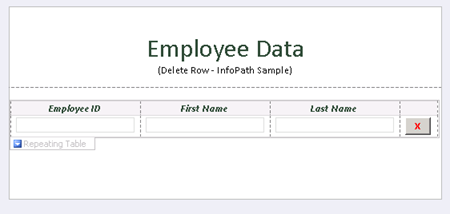
Bæta við og smelltu á “Breyta kóðinn” í Properties Button.
almennings
ógilt DeleteRow_Clicked(mótmæla senda, ClickedEventArgs e)
{
// Skrifaðu kóðann hér.
e.Source.DeleteSelf();
}
Þegar eyða uppspretta fyrir hnappinn, það eyðir núverandi hnút í DOM, hnúturinn inniheldur alla línuna.
Sæktu sýnishorn eyðublað með kóða hér.

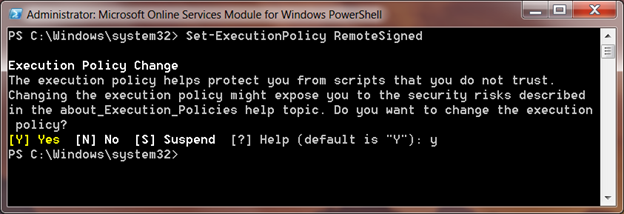
By Udayakumar Ethirajulu , 31. maí, 2011 ÉG setja í embætti bara Microsoft Online Services Module fyrir Windows PowerShell til að stilla einn skilti á fyrir Office 365.
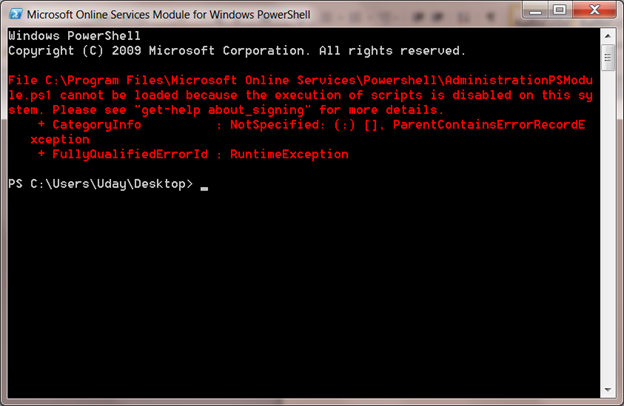
Þegar ég reyni að keyra PowerShell handriti fyrir Single Sign á Module:
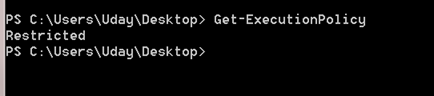
Handrit vanræksla framkvæmd stefnu er stillt á Takmörkuð. Þú getur fengið framkvæmd sjálfgefna stefnu með því að nota cmdlet Get-ExecutionPolicy
Setja-ExecutionPolicy
Set-ExecutionPolicy will set the policy in your local system, RemoteSigned trúir öllum staðbundnum skrifta og undirritað handritið niður internetið.
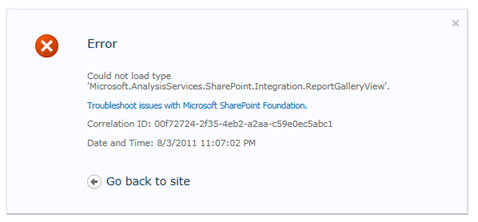
By Udayakumar Ethirajulu , 10. maí, 2011 Villa:
Gat ekki sótt tegund 'Microsoft.AnalysisServices.SharePoint.Integration.ReportGalleryView'.
Yfirlit:
Power Pivot Library hefur einhverja sérstaka skoðanir eins gallery skoða, hringekjunni skoða, etc. The vanræksla útsýni fyrir safnið hefur tilvísun frá söfnuðinum ‘Microsoft.AnalysisServices.SharePoint.Integration.ReportGalleryView’, sem er pakkað í pakka lausn “powerpivotwebapp.wsp“.
Upplausn:
Þegar PowerPivot addin vettvangi fyrir SharePoint, það bætir tveir lausn pakka til “Farm Lausnir”
Fara á Central Administration, Smelltu á Stillingar System í vinstri Navigation.
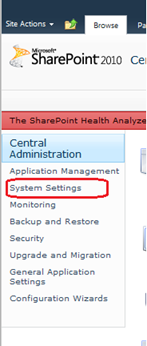
Smelltu síðan á “Stjórna bænum lausnir” stýringu Farm.

Listi yfir lausnir bænum verða skráð.
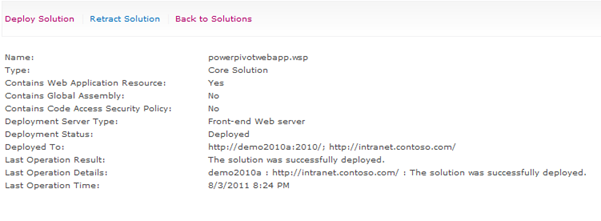
Powerpivotfarm.wsp væri nú þegar sent á heimsvísu.
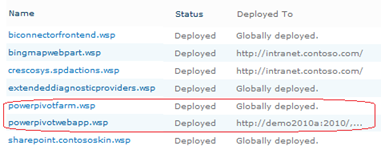
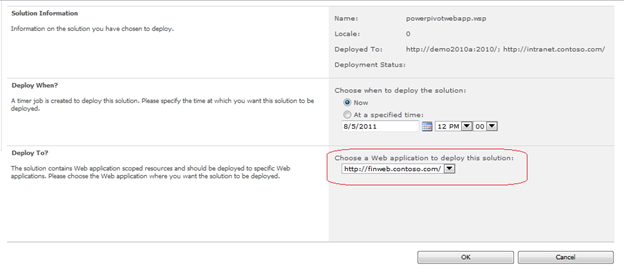
Smelltu á powerpivotwebapp.wsp og dreifa lausn á vefnum app sem þú ert að reyna að búa til Power Pivot Gallery.
Þú ert góður að fara. Búa til bókasafn núna, engin villa J
|
|