|
|
ავტორი Udayakumar Ethirajulu , 25 ივლისს, 2012 შესვლა to Office365 შემქმნელი საიტის. თუ თქვენ ხელი არ მოაწერეს up for დეველოპერი ანგარიშის, წაკითხვის ჩემი წინა პოსტი თუ როგორ იწერთ Office365 შემქმნელი ანგარიშის.
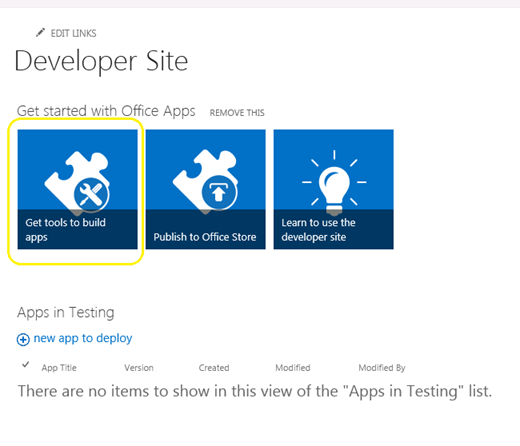
მიჩვენე SharePoint admin გვერდზე, და დააკლიკეთ “Get ინსტრუმენტები აშენება apps”
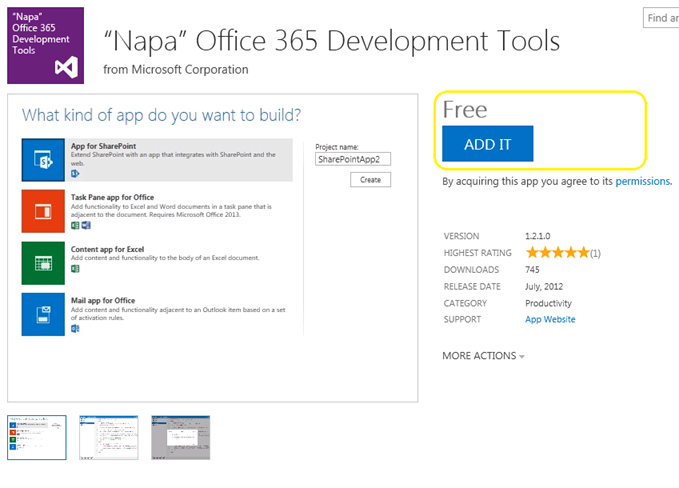
დაწკაპეთ “ADD it” ღილაკი მარჯვენა კუთხეში, და შეხვიდეთ თქვენი მოქალაქის პასპორტი მაღაზია.
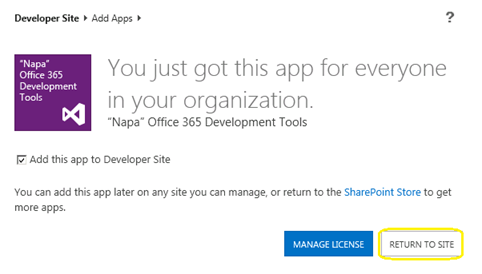
დაწკაპეთ “დაბრუნება SITE”
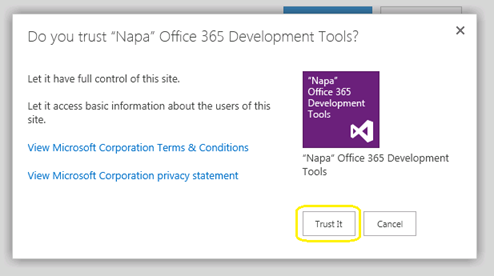
Popup გამოჩნდება დავადასტურო Trust. დაწკაპეთ “სჯერათ” ღილაკს, და მაშინ იქნება გადამისამართება დეველოპერი საიტი.
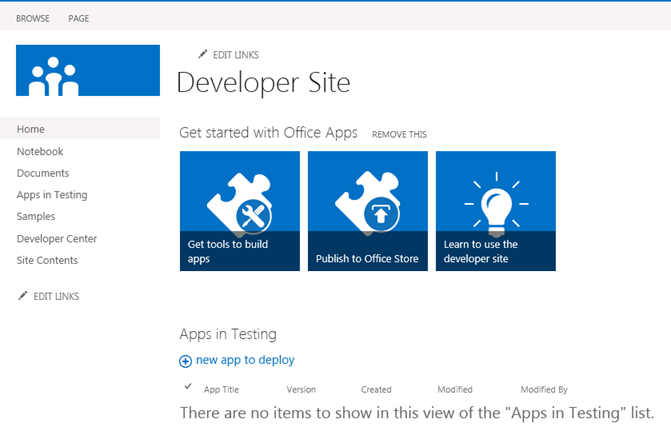
ახლა app დამონტაჟდება თქვენს დეველოპერი საიტი. დაწკაპეთ “Napa ოფისი 365 განვითარების ინსტრუმენტები” საიტის შინაარსი გვერდი იწყებს.
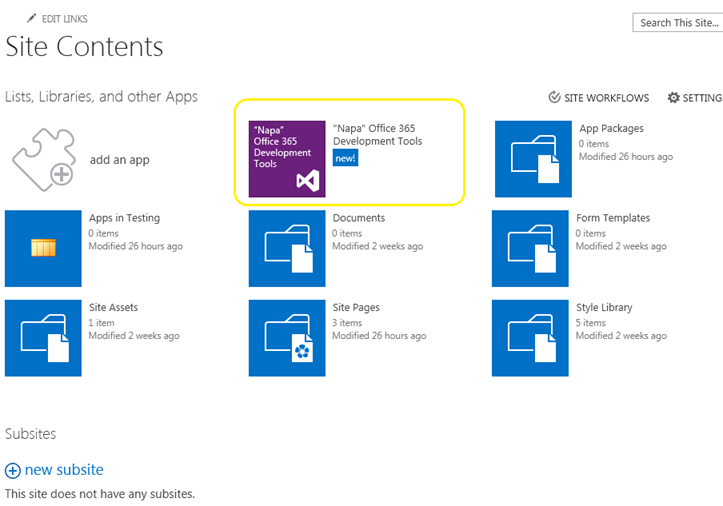
ახლა ჩვენ მივიღეთ ჩვენი განვითარების ინსტრუმენტები დამონტაჟდება. რა არის შემდეგი? მოდით ავაშენოთ HelloWorld.
ავტორი Udayakumar Ethirajulu , 24 ივლისს, 2012 Microsoft გაათავისუფლეს ოფისი / SharePoint 2013 Preview გასულ კვირას. ჩვენი შემდეგი შეკითხვა იქნება რა არის ახალი Office365; აი ისიც იწერთ დეველოპერი საიტი ხელმისაწვდომობის ქვემოთ და დაიწყოს განვითარებადი apps for 2013.
რეგისტრაცია აქ შემქმნელი საიტის
ერთხელ თქვენ დასრულდება up ნიშანი პროცესში შეძლებთ წვდომისათვის დეველოპერი საიტი. როდესაც ეს ტვირთავს პირველად, ყველა საჭირო სამსახურის იქნება მომარაგებულია.
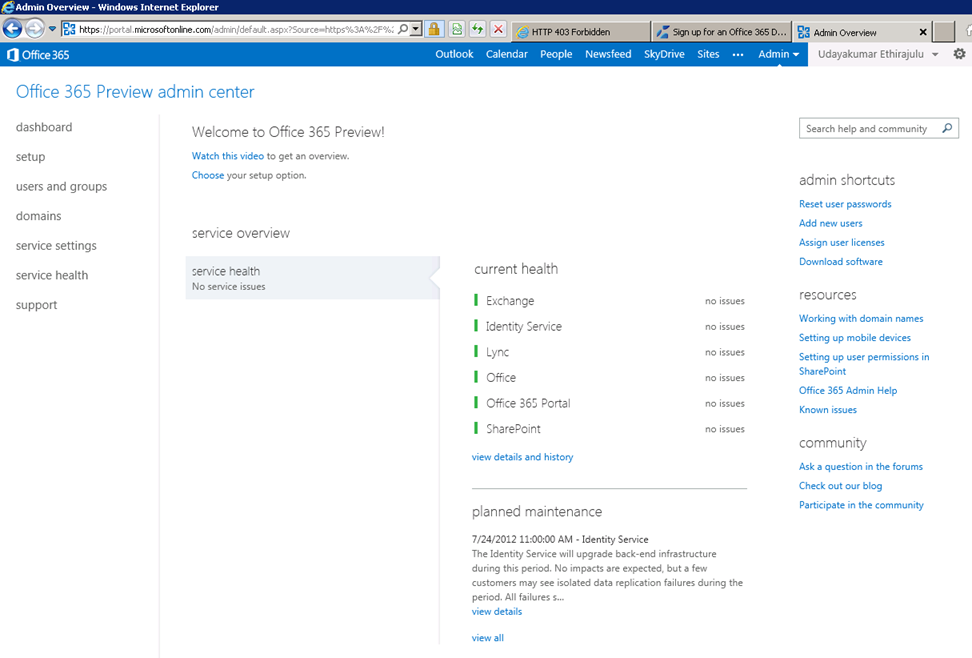
Dashboard იქნება ცარიელია ჯანმრთელობის შემოწმების მომსახურების მომარაგებულია.
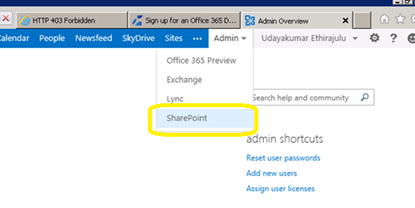
ახლა მოდით ცდილობენ მოხვდნენ SharePoint ონლაინ ადმინისტრაციის. დაწკაპეთ Admin მენიუში ლენტი და აირჩიოს SharePoint საწყისი dropdown.
SharePoint admin გვერდზე იქნება არიან სიაში საიტის კოლექციები; სტანდარტულად სამსახურის ქმნის 3 საიტი კოლექციების და ერთი საჯარო ნახვა.
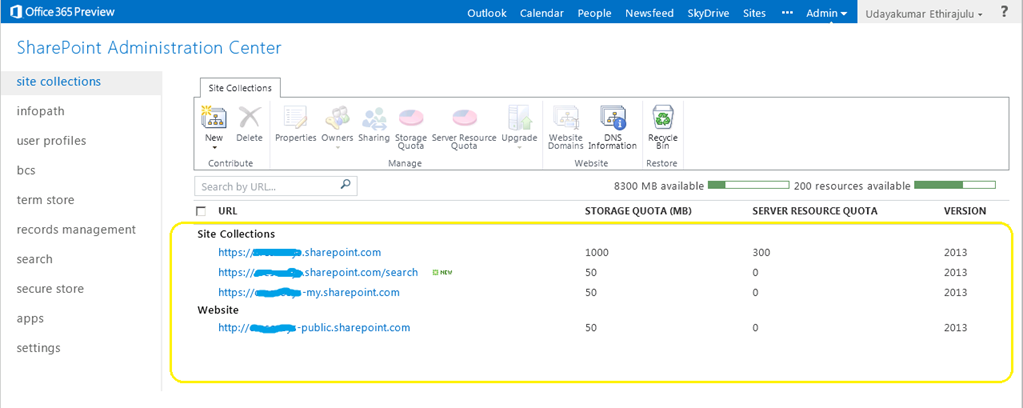
დაწკაპეთ ვერსია საიტი კოლექცია, ის ჩატვირთვა SharePoint 2013 გადახედვისას საიტი.
ჩემი შემდეგი პოსტი, ჩვენ ვსაუბრობთ ახალი განვითარების ინსტრუმენტი Office365 “Napa”
ავტორი Udayakumar Ethirajulu , 19 ივლისს, 2012
ავტორი Udayakumar Ethirajulu , 24 სექტემბერს,, 2011 ყველაზე მეტად ჩვენს ვიცი, რომ SharePoint აქვს შესრულების გამოძახილი, როდესაც სია მეტი 2000 ელემენტი. SharePoint 2010 საშუალებას გვაძლევს გააკონტროლონ რესურსი consumptions დროს ვებ პროგრამები დონე. რესურს Throttling საშუალებას მისცემს ჩვენს შექმნას მაქსიმალური ლიმიტი პოსტი სია.
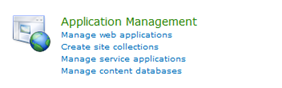
ცენტრალური ადმინისტრაცია -> (განაცხადის მართვის) მართვა ვებ პროგრამები
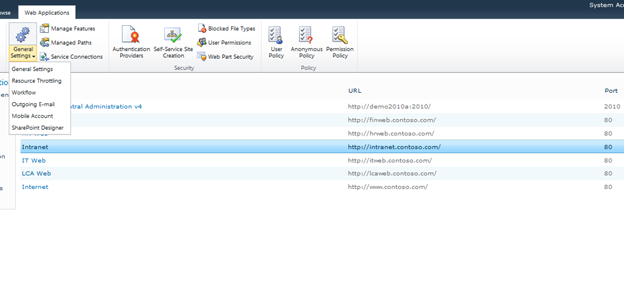
აირჩიეთ ვებ საიტს სიიდან, და დააკლიკეთ ძირითადი პარამეტრები -> რესურს Throttling
უცნობია მაქსიმალური მნიშვნელობა ხმების ელემენტი retuned თვალსაზრისით. ეს არის ლიმიტი დაბრუნების ფასეულობების views.
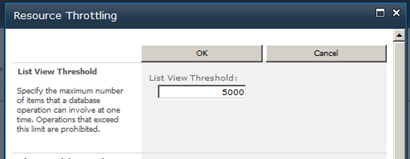
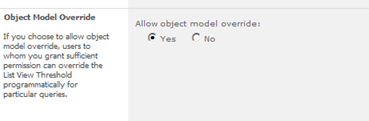
შეგიძლიათ override პარამეტრების ობიექტური მოდელის.
ავტორი Udayakumar Ethirajulu , აგვისტოს მე -4, 2011
|
რეგისტრაცია დღეს!
რიგი SharePoint 2010 ბიზნეს პროცესების ავტომატიზირება & უზრუნველყოფს consistencyin გზა თქვენი ბიზნესის აწარმოებს.
|
|
როგორც ტექნოლოგია ლიდერი, მოგეხსენებათ, გამოწვევები განხორციელების ბიზნეს პროცესების მთელი თქვენი ორგანიზაციის. როგორც წესი, პროცესები არ ინტეგრაცია გზა მოსახლეობა აქტიურად მუშაობს. იმისათვის, რომ ბიზნესის პროცესი იქნება ეფექტური, ეს უნდა იყოს ინტეგრირებული ყოველდღიური ინსტრუმენტები და პროგრამები გამოყენებული სამუშაო ადგილი ისე, რომ ნაწილი ხდება ყოველდღიური რუტინული. ელექტრონულ სამუშაო ადგილი, ეს მოიცავს ინტეგრაცია e-mail, კალენდარი, ამოცანა სიები, და თანამშრომლობის საიტები.
როგორც კომპანიები ცდილობენ მიმართოს ამ გამოწვევებს, უფრო და უფრო ხდება გარდამტეხი მიმართ ძლიერი workflow გადაწყვეტა, რომელიც საშუალებას გადაწყვეტა არქიტექტორები, დიზაინერები, და ადმინისტრატორებს, რომ გაუმჯობესდეს ბიზნეს პროცესების: Microsoft SharePoint 2010.
რეგ Microsoft SharePoint MVP Uday Ethirajulu და RSC გადაწყვეტილებები სექტემბერს 8ე, 2011 დროს 11:00am EST როგორც საინფორმაციო ვებ სემინარი (webinar) როგორც მან განიხილავს და ადასტურებს პირველადი შეღავათების გამოყენების workflows in SharePoint 2010 ხელი შეუწყოს ბიზნეს პროცესების და გააუმჯობესოს თანამშრომლობა. Uday იქნება აშუქებს ბიზნესის ღირებულების თქვენ შეუძლიათ მიიღონ 2010 და კონცენტრირება სამი პრიორიტეტული სფეროს ინტერესი:
- სიმბოლო in SharePoint Designer
- საბაჟო Workflows – გამოყენებით Visual Studio
- პროცესი ნაკადის გარეშე SharePoint workflow
ასე რომ, რეგისტრაცია დღეს, რადგან ეს ერთი ღონისძიება არ გსურთ გამოტოვება!

|
ავტორი Udayakumar Ethirajulu , ივლისს 14, 2011 აქ არის ჩემი მომავალი webinar in SharePoint 2010 Business Intelligence.
|
ახლა მიმდინარეობს Out! რეგისტრაცია დღეს!
ჩართეთ მიმართ ძლიერი Business Intelligence Solution მისცეს თქვენი ორგანიზაციის
|
როგორც ტექნოლოგია ლიდერი, თქვენ იცით, რომ ამ რთული ეკონომიკური გარემო, მიღების ხელმისაწვდომობის სწორი ინფორმაცია at უფლება დრო გახდა ერთ ერთი ყველაზე დიდი გამოწვევები ორგანიზაციები. დაინტერესებულ მხარეთა სურს სპეციალური ანგარიში / დაფა. ანალიზისა და ინტერპრეტაციის unstructured მონაცემები სულ უფრო და უფრო რთული.
როგორც კომპანიები ცდილობენ მიმართოს ამ გამოწვევებს, უფრო და უფრო ხდება გარდამტეხი მიმართ ძლიერი BI გადაწყვეტა, რომელიც უფლებამოსილებას ორგანიზაციის გადაწყვეტილების მიმღებ, აუმჯობესებს ორგანიზაციული ეფექტურობის, და უზრუნველყოფს ხერხემალი რომ მართლაც შეძლოს ეფექტურობის: Microsoft SharePoint 2010.
რეგ Microsoft SharePoint MVP Udayakumar Ethirajulu აგვისტოს მე -4, 2011 დროს 11:00იმ EST for საინფორმაციო ვებ სემინარი (webinar) როგორც მან განიხილავს და ადასტურებს ამაღელვებელი ახალი შესაძლებლობების SharePoint 2010. Uday იქნება აშუქებს ბიზნესის ღირებულების შეგიძლიათ ახალი ფუნქციების 2010 კონცენტრირება სამი პრიორიტეტული სფეროს ინტერესი:
- შესაძლებლობების Solution არქიტექტორთა და დეველოპერები
- შესაძლებლობების ინფრასტრუქტურის არქიტექტორთა და IT Pros
- შესაძლებლობების მომხმარებელი და საწარმო მთლიანად
ასე რომ, რეგისტრაცია დღეს, რადგან ეს ერთი ღონისძიება არ გსურთ გამოტოვება!

|
ავტორი Udayakumar Ethirajulu , წლის 1 ივლისს, 2011
ავტორი Udayakumar Ethirajulu , 6 ივნისს, 2011 ეს არის ერთგვარი საერთო მოთხოვნის კლიენტს აქვს სახის მცირე წაშლა ღილაკს ან გამოსახულების ყველა წაშლა.
მე ვერ შეძლო რაიმე მიდგომა გამოყენების წესები წაშლა რიგები. ერთი ხაზი C # კოდი ყველაფერს გააკეთებს ხრიკი J
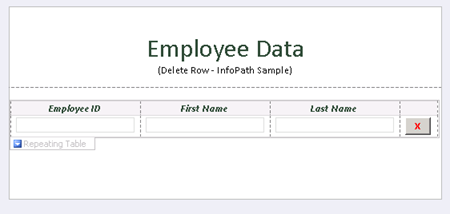
დამატების ღილაკს და დააჭირეთ “მართებული ფორმა კოდი” ამ Button თვისებები.
საჯარო
ცნოს DeleteRow_Clicked(ობიექტი გადამცემი, ClickedEventArgs და)
{
// თქვენი კოდი აქ.
e.Source.DeleteSelf();
}
როდესაც წაშლა წყარო ღილაკს, ეს წაშლის მიმდინარე კვანძის ამ DOM, კვანძის შეიცავს მთელი რიგი.
ჩამოტვირთეთ ნიმუშის ფორმა კოდი აქ.

ავტორი Udayakumar Ethirajulu , წლის 31 მაისს, 2011 უბრალოდ დაყენებული Microsoft Online Services მოდულის Windows PowerShell კონფიგურაციის ერთი ნიშანი წლის საოფისე 365.
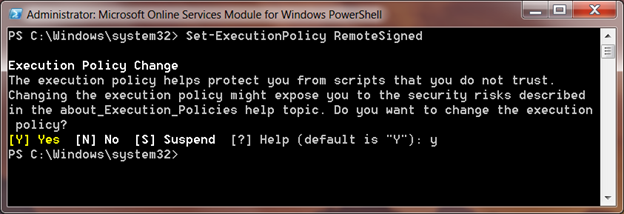
როცა სცადეთ PowerShell script ერთჯერადი შესვლა შესახებ მოდული:
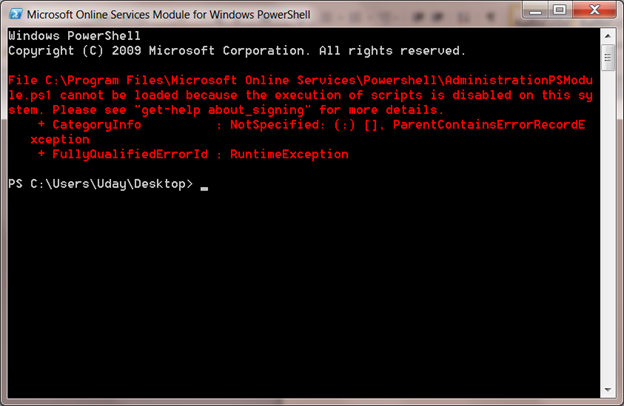
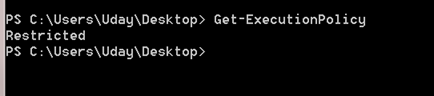
Default Script Execution პოლიტიკა მითითებული შეზღუდული. შეგიძლიათ default შესრულების პოლიტიკის გამოყენებით cmdlet მიიღეთ-ExecutionPolicy
Set-ExecutionPolicy
უცნობია-ExecutionPolicy იქნება პოლიტიკის თქვენს სისტემაში, RemoteSigned დაიჯერებს ყველა ადგილობრივი სკრიპტები და ხელმოწერილი script გადმოწერილი ინტერნეტ.
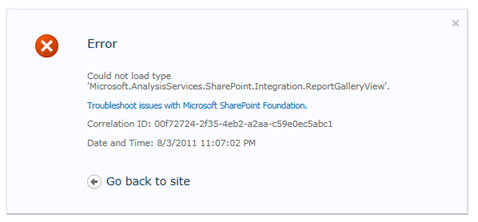
ავტორი Udayakumar Ethirajulu , წლის 10 მაისს, 2011 შეცდომა:
შეუძლებელია ტიპის 'Microsoft.AnalysisServices.SharePoint.Integration.ReportGalleryView'.
რეზიუმე:
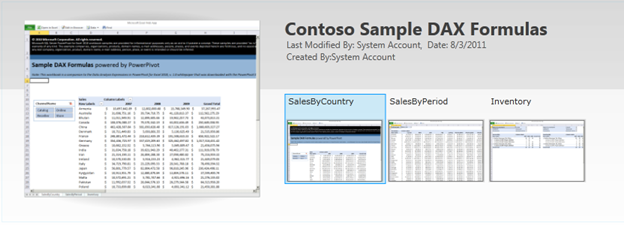
Power Pivot ბიბლიოთეკა აქვს სპეციალური ნახვა როგორიცაა გალერეა დასაწყისში, კარუსელი დასაწყისში, და ა.შ.. ავტომატურად შერჩეული, რომ ბიბლიოთეკას აქვს ცნობა ასამბლეის ‘Microsoft.AnalysisServices.SharePoint.Integration.ReportGalleryView’, რომელიც პაკეტის გადაწყვეტის პაკეტი “powerpivotwebapp.wsp“.
რეზოლუცია:
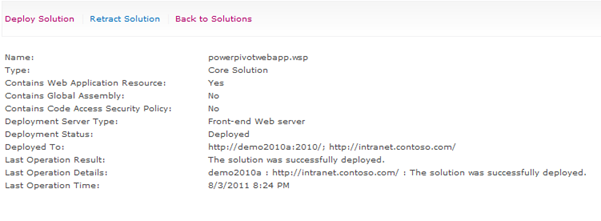
როდესაც PowerPivot addin განლაგებული for SharePoint, იგი დასძენს ორი გამოსავალი პაკეტებზე “ფერმის გადაწყვეტილებები”
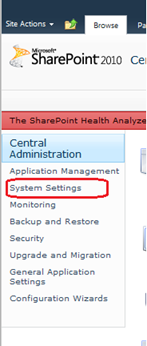
გადავიდეთ ცენტრალური ადმინისტრაციის, დაწკაპეთ სისტემის პარამეტრების მარცხენა ნავიგაცია.
შემდეგ დააჭირეთ “მართვა ფერმა გადაწყვეტილებები” ქვეშ ფერმის მართვის.

სია მეურნეობის გადაწყვეტილებები იქნება ჩამოთვლილი.
Powerpivotfarm.wsp იქნება უკვე შეიყვანეს გლობალური.
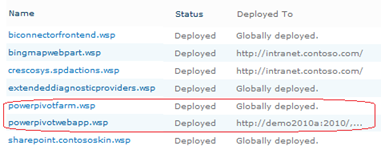
დააწკაპუნეთ powerpivotwebapp.wsp და განათავსოს გადაწყვეტა ვებ ოთახი, სადაც შექმნას ცდილობენ Power Pivot გალერეა.
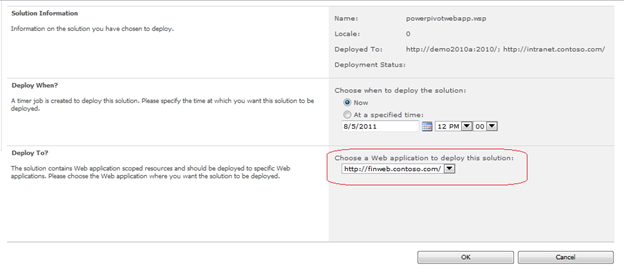
თქვენ ხართ კარგი წასვლა. შექმნა ბიბლიოთეკაში არის, არ შეცდომა J
|
|