|
|
Līdz Udayakumar Ethirajulu , 25. jūlijā, 2012 Pierakstīties Office365 Developer Site. Ja jums nav pierakstījies izstrādātāja kontā, lasīt Manā iepriekšējā amatā par to, kā pieteikties Office365 Developer kontam.
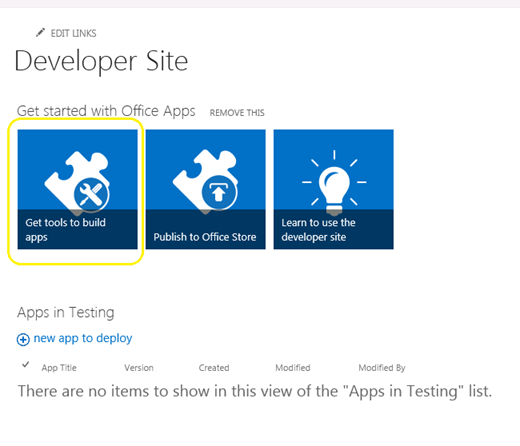
Virzīties uz SharePoint admin lapā, un noklikšķiniet uz “Get instrumentus, lai izveidotu progr”
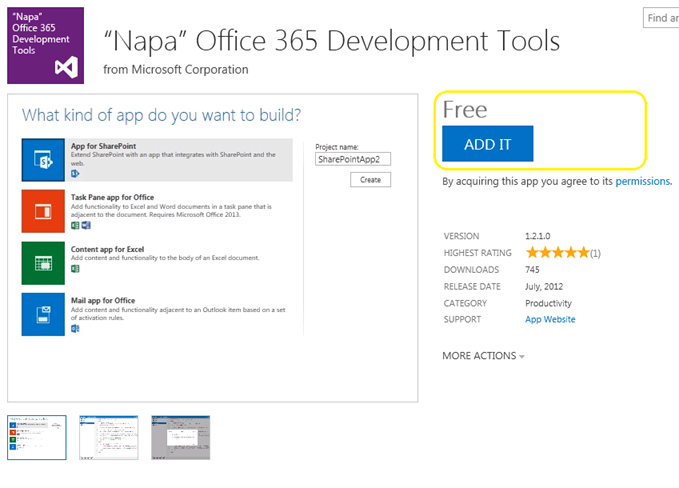
Noklikšķiniet uz “Pievienot” pogu labajā stūrī, un pierakstieties, izmantojot savu pasi veikalā.
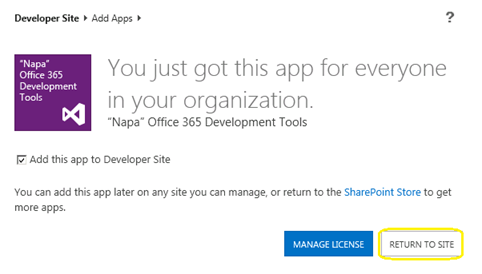
Noklikšķiniet uz “Atgriezties vietnē”
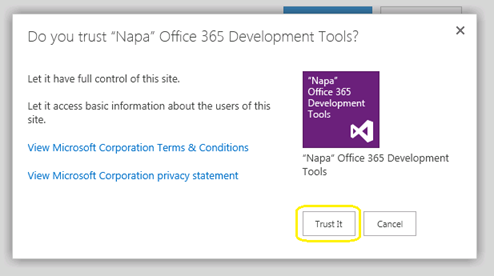
Popup parādīsies, lai apstiprinātu Trust. Noklikšķiniet uz “Uzticas” poga, un tad jums tiks novirzīts uz izstrādātāja vietni.
Tagad lietotne tiks instalēta jūsu izstrādātāja vietni. Noklikšķiniet uz “Napa birojs 365 Izstrādes rīki” jo Vietnes saturs Page sāks.
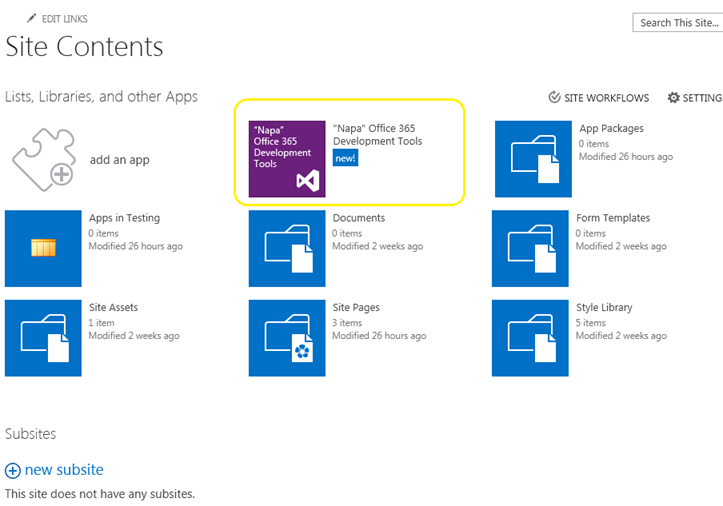
Tagad mēs saņēmām mūsu izstrādes rīki uzstādīta. Ko tālāk? Veidosim šo HelloWorld.
Līdz Udayakumar Ethirajulu , 24. jūlijā, 2012 Microsoft izlaida biroju / SharePoint 2013 Priekšskatījums pagājušajā nedēļā. Mūsu nākamais jautājums varētu būt kas jauns Office365; šeit jums iet pierakstīties uz attīstītājs vietnes piekļuves tālāk un sākt izstrādāt progr 2013.
Reģistrējies šeit, lai attīstītājs Site
Kad esat pabeidzis piereģistrēties procesu, jums būs iespēja piekļūt izstrādātāja vietni. Kad tas slodzes pirmo reizi, viss nepieciešamais pakalpojums tiks nodrošināta.
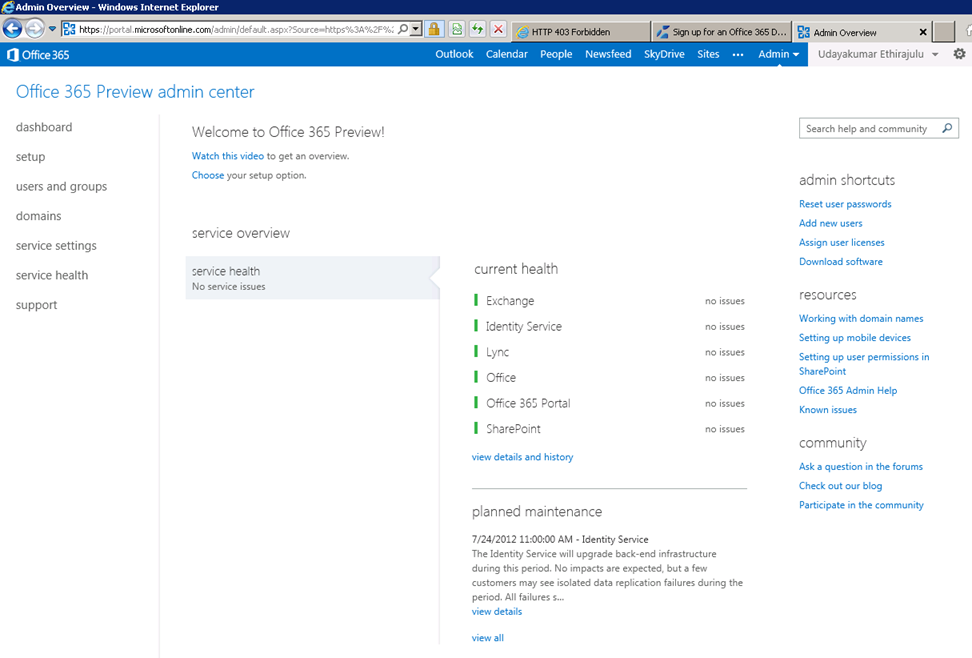
Panelis parādīs veselības pārbaudi drošās pakalpojuma.
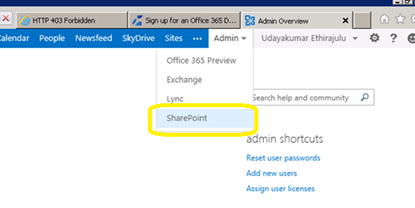
Tagad pieņemsim mēģināt iekļūt SharePoint Online pārvaldē. Noklikšķiniet uz Admin izvēlnē lenti un izvēlēties SharePoint no nolaižamā.
SharePoint admin lapa parādīs sarakstu Vietnes Krājumi; pēc noklusējuma pakalpojums rada 3 vietņu kolekcijas un vienu publiski pieejamā tīmekļa vietnē.
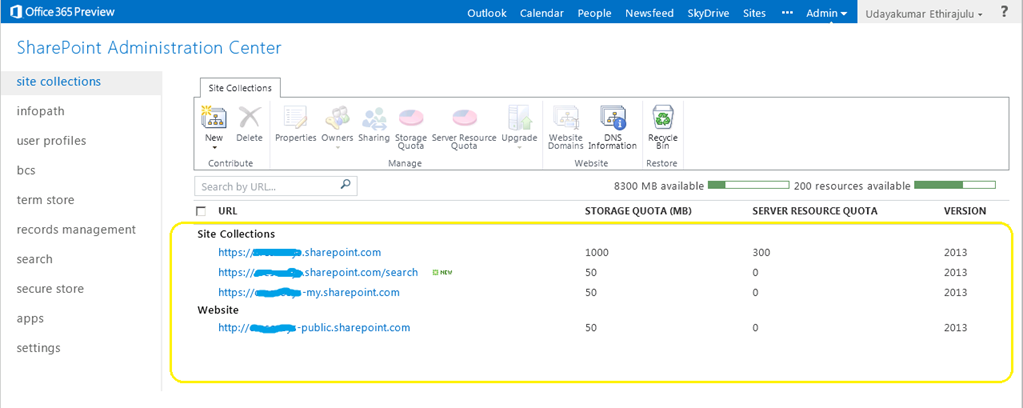
Noklikšķiniet uz portāla vietņu kolekcijā, tā būs slodze SharePoint 2013 priekšskatījums vietā.
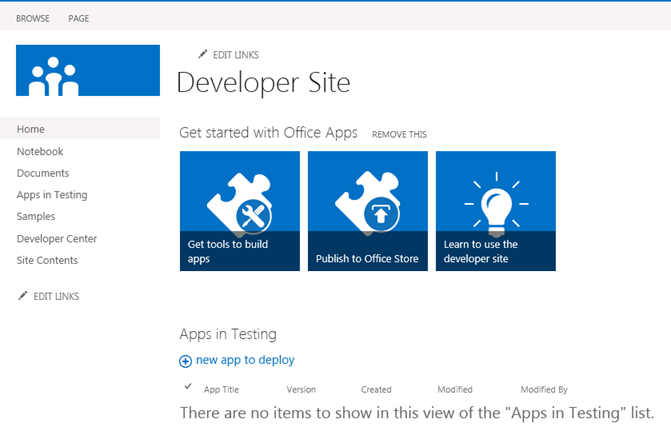
Manā nākamajā amatā, mēs runājam par jauno attīstības instrumentu, lai Office365 “Napa”
Līdz Udayakumar Ethirajulu , gada jūlijs 19, 2012
Līdz Udayakumar Ethirajulu , gada 24 septembris, 2011 Lielākā daļa no mums zina, ka SharePoint ir snieguma sekas, ja saraksta skats ir vairāk 2000 priekšmeti. SharePoint 2010 ļauj mums veikt kontroli pār resursu patēriņu pēc Web aplikāciju līmenī. Resurss Throttling ļautu mums noteikt maksimālo robežu par saraksta skatā.
Centrālā administrācija -> (Pieteikums vadība) Pārvaldīt Web Pieteikumi
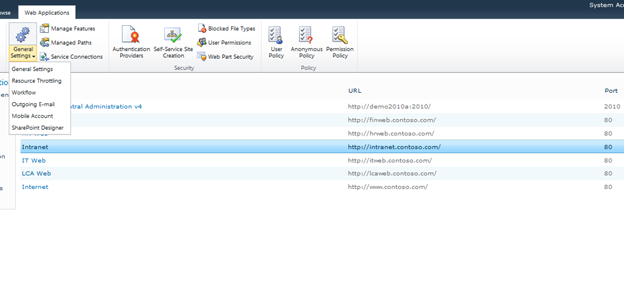
Izvēlieties web programmu no saraksta, un noklikšķiniet uz Vispārīgie iestatījumi -> Resurss Throttling
Noteikt maksimālo uz numuru posteņu vērtību retuned ņemot. Tas ir robeža atgriezties vērtības par viedokļiem.
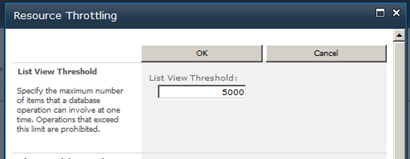
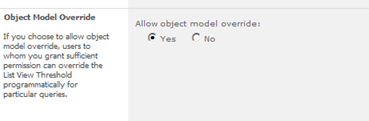
Jūs varat ignorēt iestatījumus objekta modeli.
Līdz Udayakumar Ethirajulu , gada augustā 4., 2011
|
Reģistrēties Tagad!
Vērsties SharePoint 2010 automatizēt biznesa procesus & nodrošināt consistencyin kā jūsu uzņēmums darbojas.
|
|
Kā tehnoloģiju līderis, Jūs zināt, problēmas īstenošanas biznesa procesus visā uzņēmumā. Parasti, procesi nav integrēt ar veidu, kādā cilvēki faktiski strādā. Par uzņēmējdarbības process būtu efektīvs, tas jāintegrē ar ikdienas instrumentu un lietojumprogrammu izmanto darba vietā, lai tā kļūst par daļu no ikdienas rutīnas. Aizsardzību elektronisko vietā, tas ietver integrāciju ar e-pastu, kalendāri, uzdevumu saraksti, un sadarbības Web vietas.
Jo uzņēmumi cenšas risināt šīs problēmas, vairāk un vairāk vēršas pret noturīgu darbplūsmas risinājumu, kas ļauj risinājumu arhitektiem, dizaineri, un administratoriem, lai uzlabotu biznesa procesus: Microsoft SharePoint 2010.
Pievienojieties Microsoft SharePoint MVP Uday Ethirajulu un RSC Solutions septembrī 8th, 2011 pēc 11:00am EST par informatīvo tīmekļa seminārs (vebinārs) kā viņš apspriež un parāda galvenās priekšrocības, izmantojot darbplūsmas SharePoint 2010 lai atvieglotu biznesa procesus un uzlabot sadarbību. Uday uzsvērs biznesa vērtību var iegūt no 2010 un koncentrēties uz trīs jomām interešu:
- Darbplūsma SharePoint Designer
- Pielāgotas darbplūsmas – Izmantojot Visual Studio
- Procesa plūsmas bez SharePoint darbplūsmas
Tā reģistrēties šodien, jo tas ir viens notikums jūs nevēlaties palaist garām!

|
Līdz Udayakumar Ethirajulu , gada 14 jūlijs, 2011 Te ir mana upcoming webinar SharePoint 2010 Business Intelligence.
|
Laiks ir Running Out! Reģistrēties Tagad!
Pievērsties stabila Business Intelligence risinājumu, lai dotu savu organizāciju
|
Kā tehnoloģiju līderis, jūs zināt, šajā sarežģītajā ekonomiskajā vidē, iegūt piekļuvi pareizo informāciju īstajā laikā ir kļuvusi par vienu no lielākajiem izaicinājumiem organizācijām. Galvenā ieinteresētā vēlas īpašu ziņojumu / paneli. Analīze un nestrukturētas datu interpretācija kļūst arvien sarežģītāka.
Jo uzņēmumi cenšas risināt šīs problēmas, vairāk un vairāk vēršas pret noturīgu BI risinājumu, kas dod organizācijas lēmumu pieņēmējiem, uzlabo organizatorisko efektivitāti, un nodrošina mugurkauls, lai patiesi ļautu IT efektivitāti: Microsoft SharePoint 2010.
Pievienojieties Microsoft SharePoint MVP Udayakumar Ethirajulu gada augustā 4., 2011 pēc 11:00gada EST par informatīvu tīmekļa seminārs (vebinārs) kā viņš apspriež un parāda visvairāk aizraujošas jaunas iespējas SharePoint 2010. Uday uzsvērs biznesa vērtību var iegūt no jaunajiem līdzekļiem 2010 koncentrēties uz trīs jomām interešu:
- Spējas Solution arhitektu un izstrādātājiem
- Spējas infrastruktūras arhitektu un IT profesionāļiem
- Spējas lietotājiem un jo visu uzņēmumu
Tā reģistrēties šodien, jo tas ir viens notikums jūs nevēlaties palaist garām!

|
Līdz Udayakumar Ethirajulu , gada 1.jūlijā, 2011
Līdz Udayakumar Ethirajulu , gada 6 jūnijā, 2011 Tas ir sava veida kopīgu lūgumu klientam ir sava veida mazo dzēšanas pogu vai attēlu, kas ik izdzēst.
Es nevarēju atrast nevienu pieeju izmantojot noteikumus, lai dzēstu rindas. Viena līnija C # kods varētu darīt to triks J
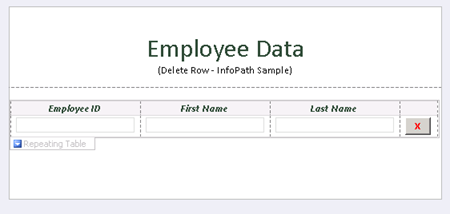
Pievienot pogu un noklikšķiniet uz “Rediģēt veidlapas kodu” jo Button Properties.
valsts
anulēt DeleteRow_Clicked(objekts raidītājs, ClickedEventArgs un)
{
// Uzrakstiet savu kodu šeit.
e.Source.DeleteSelf();
}
Kad izdzēst avots pogas, tā svītrota pašreizējā mezglu DOM, mezglu satur visu rindu.
Lejupielādēt parauga veidlapu ar kodu šeit.

Līdz Udayakumar Ethirajulu , 31.maijā, 2011 Es tikko instalēta Microsoft Online Services modulis Windows PowerShell, lai konfigurētu vienu zīmi par Office 365.
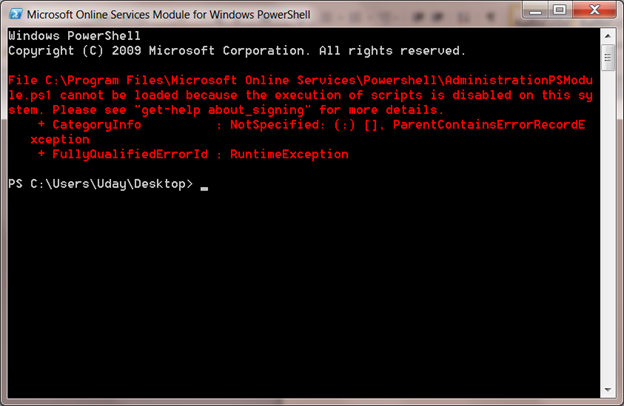
Kad mēģinu palaist PowerShell skriptu vienoto pierakstīšanos moduļa:
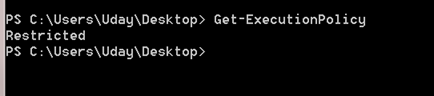
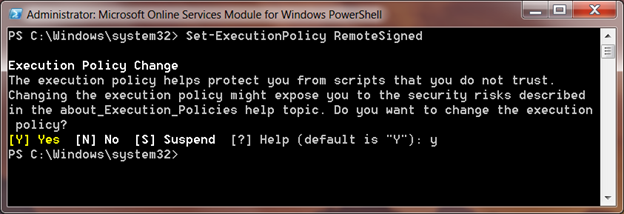
Noklusējuma skriptu izpildes politika ir Ierobežots. Jūs varat saņemt noklusējuma izpildes politiku, izmantojot cmdlet Get-ExecutionPolicy
Set-ExecutionPolicy
Set-ExecutionPolicy tiks noteikta politika jūsu vietējā sistēmā, RemoteSigned uzticēsies visus vietējos skripti un paraksta script lejupielādēt internetā.
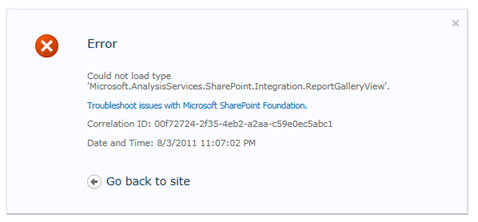
Līdz Udayakumar Ethirajulu , gada 10 maijā, 2011 Kļūda:
Nevarēja ielādēt tips "Microsoft.AnalysisServices.SharePoint.Integration.ReportGalleryView '.
Kopsavilkums:
Jauda Pivot Bibliotēka ir dažas īpašas viedokli, piemēram, galerijas skatā, karuselis skats, uc. Noklusējuma skats bibliotēkā ir atsauce no komplekta ‘Microsoft.AnalysisServices.SharePoint.Integration.ReportGalleryView’, kas ir iepakota risinājumu paketi “powerpivotwebapp.wsp“.
Rezolūcija:
Kad PowerPivot addin izvietots SharePoint, tā piebilst divas risinājumu paketes “Farm risinājumi”
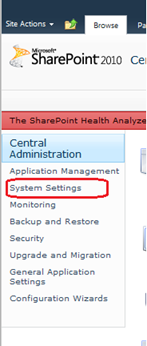
Iet uz centrālo administrāciju, Noklikšķiniet uz Sistēmas iestatījumos kreisajā navigācijas.
Tad noklikšķiniet uz “Vadīt saimniecību risinājumi” saskaņā Farm Management.

Saraksts saimniecības risinājumu tiks uzskaitīti.
Powerpivotfarm.wsp būtu jau izvietoti visā pasaulē.
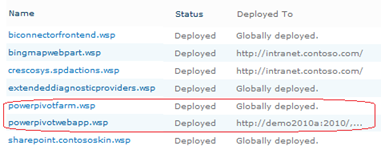
Noklikšķiniet uz powerpivotwebapp.wsp un izvietot risinājumu web app, kur jūs mēģināt izveidot Power Pivot galeriju.
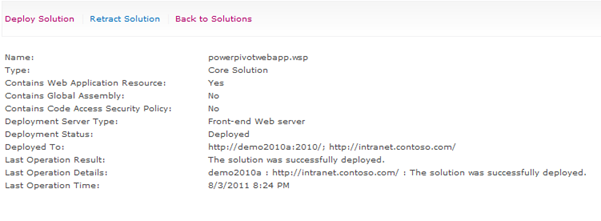
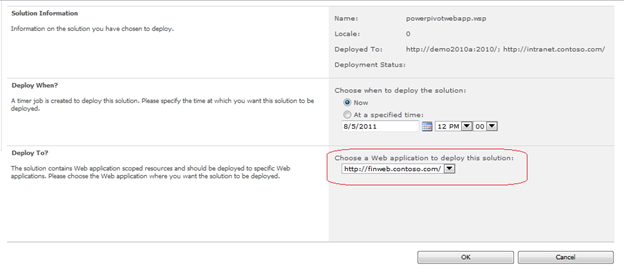
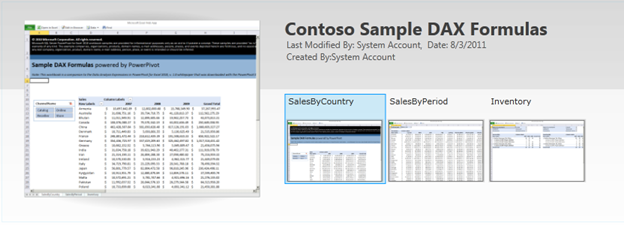
Jums ir labi iet. Izveidot bibliotēku tagad, nav kļūda J
|
|