|
|
قسم Udayakumar Ethirajulu , جولائی 25th پر, 2012 Office365 ڈیولپر سائٹ میں سائن ان کریں. اگر آپ ڈیولپر اکاؤنٹ کے لئے سائن اپ نہیں, پڑھنے میری گزشتہ پوسٹ کس طرح Office365 ڈیولپر اکاؤنٹ کے لئے سائن اپ کرنے کے.
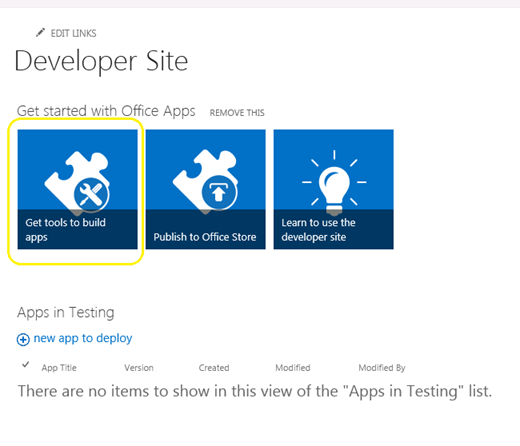
شیئرپوائنٹ ایڈمن صفحے پر جائیں, پر کلک کریں اور “اوزار اطلاقات کی تعمیر حاصل کریں”
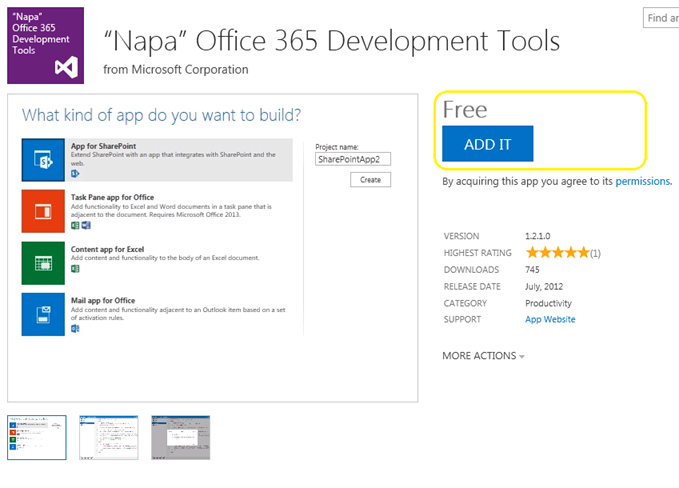
پر کلک کریں “میں اسے شامل کریں” کے دائیں کونے میں بٹن پر کلک کیجیئے, اور سٹور کے لئے اپنا پاسپورٹ کا استعمال کرتے ہوئے میں سائن ان کریں.
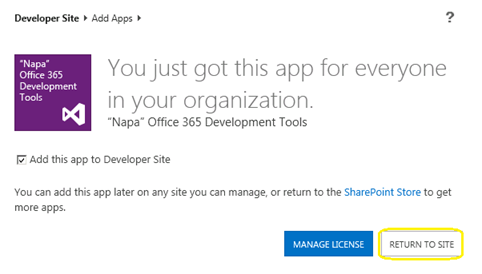
پر کلک کریں “سائٹ پر واپس”
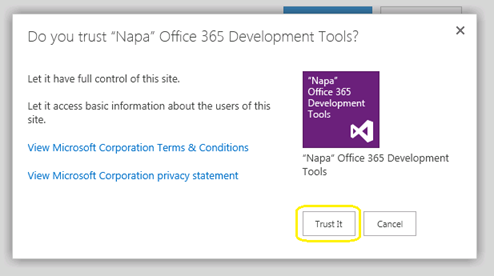
پاپ اپ ٹرسٹ کی تصدیق دکھایا جائے گا. پر کلک کریں “اس پر بھروسہ رکھو” بٹن, اور پھر آپ کو ڈویلپر سائٹ پر ری ڈائریکٹ گا.
اب اے پی پی اپنا ڈویلپر کی ویب سائٹ میں نصب کیا جائے گا. پر کلک کریں “ناپا آفس 365 ترقی کا آلہ” سائٹ کی فہرست کے صفحہ میں شروع کرنے کا.
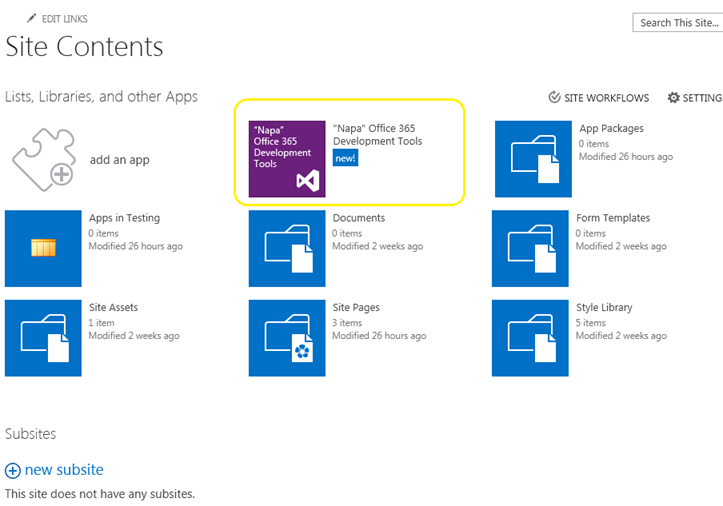
اب ہم نے ہماری ترقی کا آلہ نصب. کے بعد کیا ہے? آو HelloWorld تعمیر.
قسم Udayakumar Ethirajulu , جولائی 24th پر, 2012 مائیکروسافٹ آفس / شیئرپوائنٹ جاری 2013 کا مشاہدہ گزشتہ ہفتے. ہمارا اگلا سوال Office365 میں نیا کیا ہے; آپ یہاں جانا ڈویلپر ویب سائٹ تک رسائی کے لئے ذیل میں سائن ان کریں اور کے لئے اطلاقات کی ترقی کرنا شروع کریں 2013.
ڈیولپر سائٹ کے لئے یہاں سائن اپ
تم ایک بار جب آپ یہ عمل سائن اپ ختم ڈیولپر سائٹ تک رسائی حاصل کرنے کے قابل ہو جائے گا. یہ پہلی بار ہے جب بوجھ, تمام مطلوبہ سروس فراہم رکھا جائے گا.
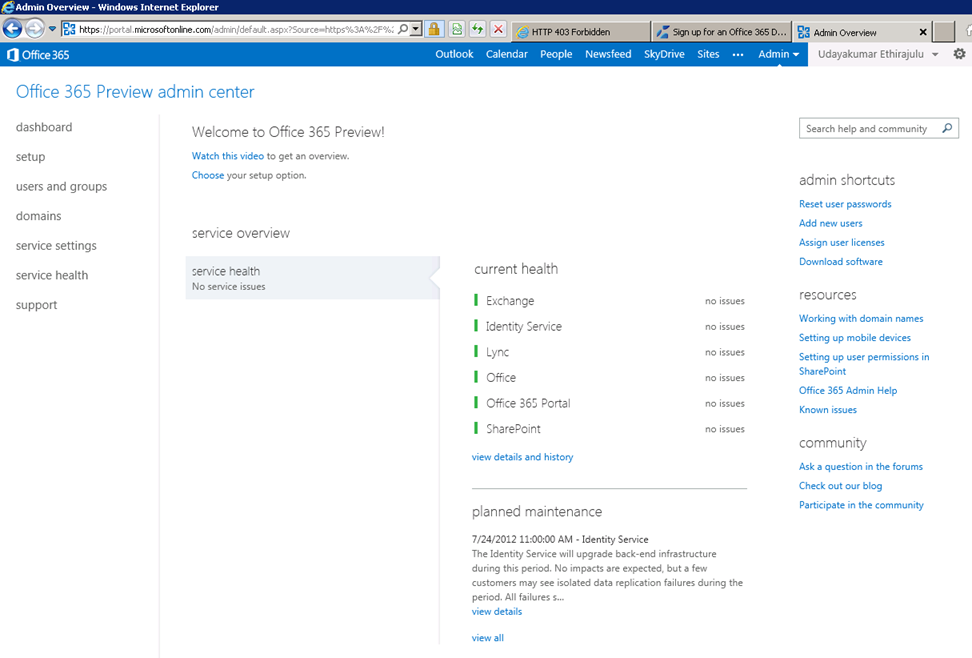
ڈیش بورڈ انتظام خدمت کی صحت کی پڑتال کے دکھائے گا.
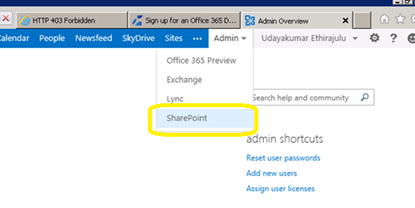
اب شیئرپوائنٹ آن لائن انتظامیہ میں حاصل کرنے کی کوشش کریں. ربن میں ایڈمن مینو پر کلک کریں اور ڈراپ ڈاؤن سے شیئرپوائنٹ منتخب کریں.
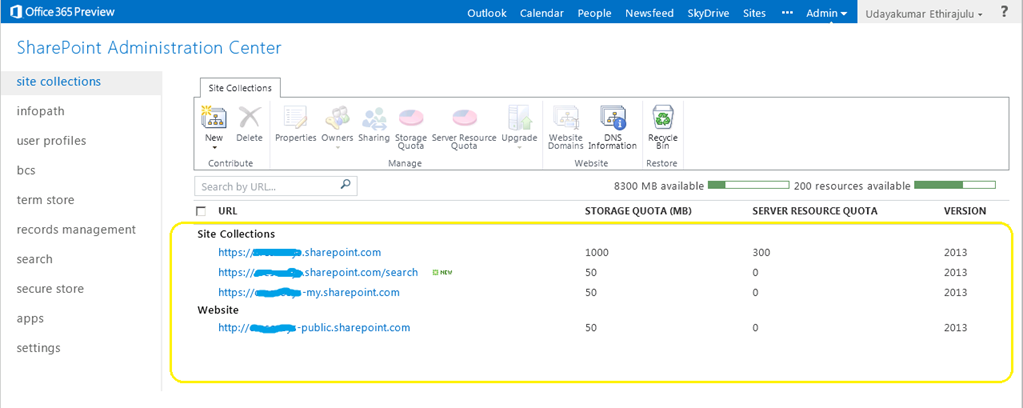
شیئرپوائنٹ منتظم صفحے کو سائٹ کے مجموعے کی فہرست ظاہر کرے گا; ڈیفالٹ کی طرف سے سروس کی تخلیق 3 سائٹ مجموعہ اور ایک عوامی ویب سائٹ.
پورٹل سائٹ کے مجموعہ پر کلک کریں., شیئرپوائنٹ لوڈ 2013 پیش منظر سائٹ.
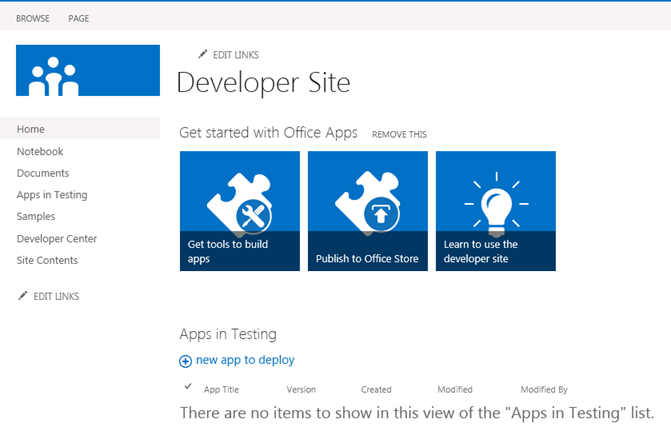
میری اگلی پوسٹ میں, نئے کی ترقی کے آلے کے بارے میں ہم نے Office365 کے لئے بات کریں گے “ناپا”
قسم Udayakumar Ethirajulu , جولائی 19th پر, 2012
قسم Udayakumar Ethirajulu , 24th ستمبر, 2011 ہم میں سے اکثر جانتے ہیں کہ شیئرپوائنٹ کارکردگی اثر پڑتا ہے, فہرست دیکھیں جب ہے 2000 اشیاء. SharePoint 2010 ہمیں ویب ایپلیکیشن کی سطح پر وسائل consumptions کنٹرول لینے کے لئے کی اجازت دیتا ہے. وسائل تراٹلنگ ہمیں فہرست کے نقطہ نظر کے مطابق زیادہ سے زیادہ حد مقرر کرنے کی اجازت مل سکتی ہے.
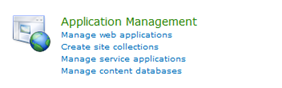
مرکزی انتظامیہ -> (درخواست مینجمنٹ) ویب اطلاقات دیں
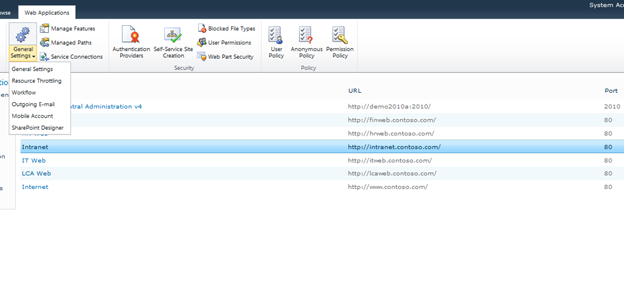
فہرست سے ویب ایپلیکیشن منتخب کریں, اور عام ترتیبات پر کلک کریں -> وسائل تراٹلنگ
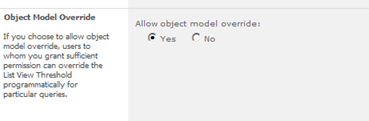
نمبر اشیاء کے لئے زیادہ سے زیادہ قیمت کو ذہن میں retuned مقرر کریں. یہ خیالات اقدار پر واپس حد ہے.
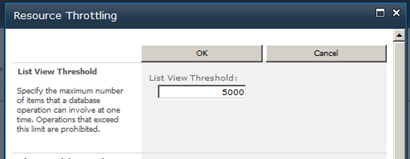
آپ کے اعتراض کی ماڈل کے لیے ترتیبات کی جگہ لے لے کر سکتے ہیں.
قسم Udayakumar Ethirajulu , اگست 4th, 2011
|
آج رجسٹریشن!
شیئرپوائنٹ مڑیں 2010 کاروباری عمل کو خودکار کرنے کے لئے & جس طرح سے آپ کے کاروبار چلایا جاتا ہے consistencyin فراہم.
|
|
ٹیکنالوجی کے رہنما کے طور پر, آپ کو آپ کی تنظیم کے اس پار کاروباری عمل کو لاگو کرنے کے چیلنجوں کو معلوم ہے. عام طور پر, عمل جس طرح لوگوں کو اصل کام کے ساتھ ضم نہیں کرتے. ایک کاروبار کے عمل کے لئے مؤثر ہونا, یہ روز مرہ کے معمول کا حصہ بن جاتا ہے تاکہ وہ کام کی جگہ میں استعمال کیا جاتا روزمرہ آلات اور ایپلی کیشنز کے ساتھ ضم ہونا ضروری ہے. الیکٹرانک کام کی جگہ, اس ای میل کے ساتھ انضمام شامل ہیں, کیلنڈر, کام کی فہرست, اور تعاون ویب سائٹس.
جیسا کہ کمپنیوں کو ان چیلنجز سے نمٹنے کے کے لئے کی تلاش, زیادہ سے زیادہ حل ٹیکٹس کے قابل بناتا ہے کہ ایک مضبوط کام کے فلو کو حل کی طرف رخ کر رہے ہیں, ڈیزائنرز, اور منتظمین کاروباری عمل کو بہتر بنانے کے: مائیکروسافٹ شیئرپوائنٹ 2010.
ستمبر کو مائیکروسافٹ شیئرپوائنٹ MVP ادی Ethirajulu اور RSC مسائل کے حل شمولیت 8ویں, 2011 پر 11:00AM EST ایک معلوماتی ویب سیمینار کے لئے (Webinar) وہ شیئرپوائنٹ میں workflows کا استعمال کرتے ہوئے کے بنیادی فوائد بحث کی اور ثبوت کے طور پر 2010 کاروباری عمل کو آسان بنانے اور تعاون کو بہتر بنانے کے. ادی تم سے حاصل کر سکتے ہیں کاروباری قدر کو اجاگر کرے گا 2010 اور سود کے تین علاقوں پر توجہ مرکوز:
- شیئرپوائنٹ کام کے فلو کو ڈیزائنر میں
- اپنی مرضی کے Workflows – وژول اسٹوڈیو کا استعمال کرتے ہوئے
- شیئرپوائنٹ کام کے فلو کو بغیر عمل کے بہاؤ
تو آج رجسٹر, کیونکہ یہ ایک واقعہ ہے آپ کو یاد نہیں کرنا چاہتا!

|
قسم Udayakumar Ethirajulu , 14th جولائی کو, 2011 یہاں میرے شیئرپوائنٹ میں آئندہ webinar ہے 2010 بزنس انٹیلی جنس.
|
وقت گزرتا جارہا ہے! آج رجسٹریشن!
ایک مضبوط بزنس انٹیلی جنس کے حل کی طرف آپ کی تنظیم کو بااختیار بنانے کی طرف
|
ٹیکنالوجی کے رہنما کے طور پر, آپ اس مشکل اقتصادی صورتحال میں جانتا ہوں, صحیح وقت پر صحیح معلومات تک رسائی حاصل کرنے سے ان تنظیموں کے لئے سب سے بڑے چیلنجوں میں سے ایک بن گیا ہے. ایک اہم اسٹیک ہولڈر ایک خصوصی رپورٹ / ڈیش بورڈ چاہتا ہے. تجزیہ اور unstructured اعداد و شمار کے فرمان بننے زیادہ سے اور زیادہ پیچیدہ ہے.
جیسا کہ کمپنیوں کو ان چیلنجز سے نمٹنے کے کے لئے کی تلاش, زیادہ سے زیادہ ایک مضبوط BI حل ہے کہ ایک تنظیم کے فیصلہ سازوں کے حق کی طرف تبدیل کر رہے ہیں, تنظیمی تاثیر بہتر, اور ریڑھ کی ہڈی فراہم کرتا ہے حقیقتا اس کی کارکردگی کو چالو کرنے کے: مائیکروسافٹ شیئرپوائنٹ 2010.
مائیکروسافٹ شیئرپوائنٹ MVP Udayakumar اگست 4th پر Ethirajulu شمولیت, 2011 پر 11:00ہوں ایک معلوماتی ویب سنگوشٹھی میں کے لئے EST (Webinar) کے طور پر وہ بحث اور شیئرپوائنٹ کے سب سے زیادہ دلچسپ نئے صلاحیتوں کا ثبوت ہے 2010. ادی کاروبار قدر آپ میں نئی خصوصیات سے حاصل کر سکتے ہیں نمایاں کرے گا 2010 دلچسپی کے تین علاقوں پر اپنی توجہ مرکوز:
- حل ٹیکٹس اور ڈویلپرز کے لئے صلاحیتوں
- انفراسٹرکچر ٹیکٹس اور پیشہ IT کے لئے صلاحیتوں
- مجموعی طور پر صارفین اور انٹرپرائز کے لئے صلاحیتوں
تو آج رجسٹر, کیونکہ یہ ایک واقعہ ہے آپ کو یاد نہیں کرنا چاہتا!

|
قسم Udayakumar Ethirajulu , 1st جولائی کو, 2011
قسم Udayakumar Ethirajulu , 6th جون کو, 2011 یہ کلائنٹ سے مشترکہ درخواست ہر طرح کے چھوٹے کو حذف بٹن یا تصویر کو حذف کرنے کی ضرورت ہے کس قسم کی ہے.
میں کسی بھی صفیں حذف کریں کے قواعد کا استعمال کرتے ہوئے نقطہ نظر کو تلاش نہیں کر سکا. ایک لائن C # کوڈ چال کروں گا J
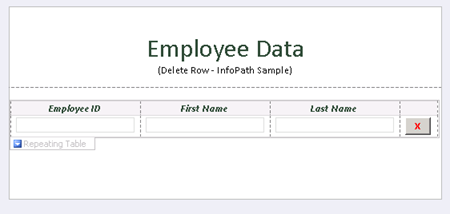
بٹن کو شامل کریں اور اس پر کلک کریں “فارم کوڈ میں ترمیم کریں” بٹن کی پراپرٹیز میں.
عوامی
خالی DeleteRow_Clicked(اعتراض سٹیشن, ClickedEventArgs اور)
{
// یہاں اپنا کوڈ لکھیں.
e.Source.DeleteSelf();
}
بٹن کے لئے ذریعہ خارج کر دیں تو, یہ اخراج ڈوم میں موجودہ نوڈ, نوڈ پوری قطار پر مشتمل ہے.
یہاں کوڈ کے ساتھ نمونہ فارم ڈاؤن لوڈ.

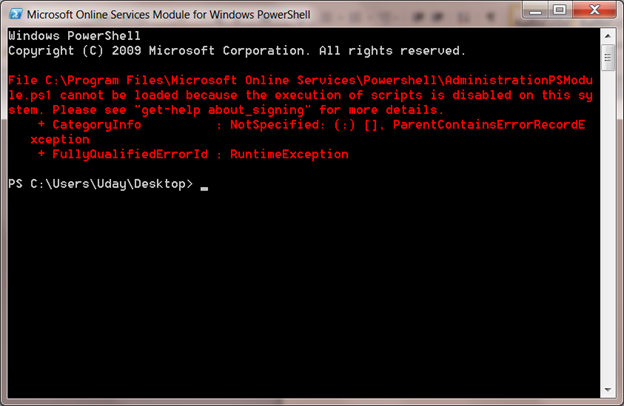
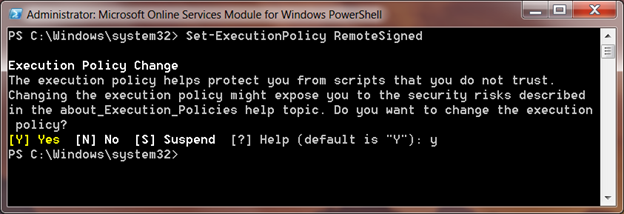
قسم Udayakumar Ethirajulu , 31st مئی کو, 2011 میں صرف Windows PowerShell کے کے لیے مائیکروسافٹ آن لائن سروسز کے ماڈیول انسٹال آفس کے لئے ایک دستخط کرنے کے لئے کو ترتیب دیں 365.
میں ماڈیول پر سنگل سائن ان کریں کے لئے PowerShell کے سکرپٹ کو چلانے کے لئے جب کوشش کرتے ہیں:
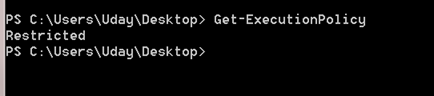
پہلے سے طے شدہ سکرپٹ پھانسی کی پالیسی کو قابو میں کرنے کے لئے مقرر کیا گیا ہے. آپ cmdlet کے کریں Get-ExecutionPolicy کا استعمال کرتے ہوئے کی طرف سے پہلے سے طے شدہ پھانسی کی پالیسی حاصل کر سکتے ہیں
سیٹ ExecutionPolicy
سیٹ ExecutionPolicy اپنے مقامی نظام میں پالیسی ترتیب دے گا, RemoteSigned تمام مقامی اسکرپٹ پر بھروسہ اور سکرپٹ ڈاؤن لوڈ انٹرنیٹ پر دستخط کریں گے.
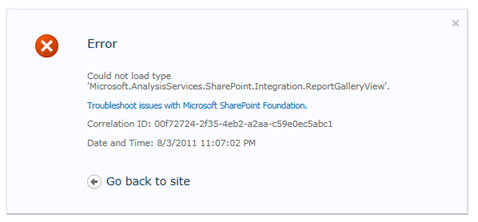
قسم Udayakumar Ethirajulu , 10th مئی کو, 2011 خرابی:
میں قسم 'Microsoft.AnalysisServices.SharePoint.Integration.ReportGalleryView' لوڈ نہیں کیا جا سکا.
خلاصہ:
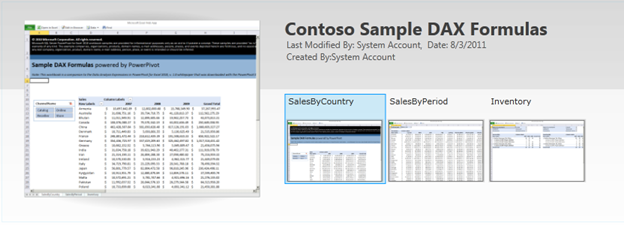
پاور محور لائبریری گیلری ، نگارخانہ قول جیسے کچھ خاص خیالات ہیں, carousel قول, وغیرہ. لائبریری کے لئے پہلے سے طے شدہ نقطہ نظر اسمبلی سے حوالہ ‘Microsoft.AnalysisServices.SharePoint.Integration.ReportGalleryView’, جو حل پیکیج میں پیک ہے “powerpivotwebapp.wsp“.
قرارداد:
PowerPivot اضافہ شیئرپوائنٹ کے لئے جب تعینات, اس کے دو حل پیکجوں جوڑتا ہے “فارم حل”
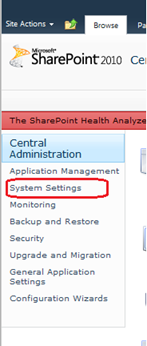
مرکزی انتظامیہ کو دیکھیے, بائیں نیویگیشن نظام کی ترتیبات پر کلک کریں.
اس کے بعد پر کلک کریں “فارم حل دیں” فارم مینجمنٹ کے تحت.

فارم حل کی فہرست درج رکھا جائے گا.
Powerpivotfarm.wsp پہلے ہی دنیا بھر میں تعینات کریں گے.
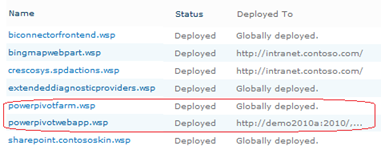
powerpivotwebapp.wsp پر کلک کریں اور ویب اپلی کیشن کے حل جہاں آپ کو پاور محور گیلری، نگارخانہ پیدا کرنے کی کوشش کر رہے ہیں تعینات.
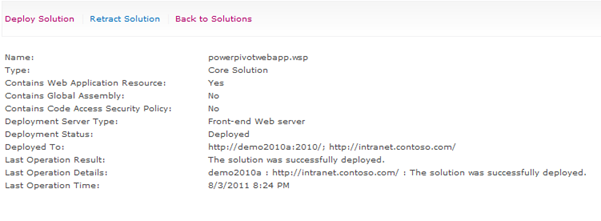
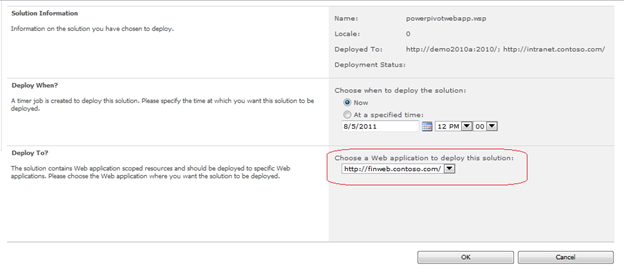
تم جانا اچھی ہو.. لائبریری بنائیں, کوئی غلطی J
|
|